User Review (1)  Go to Win ->
$37.50 $18.75 50% OFF
Wanna to watch Blu-ray movies on your iPod anywhere at anytime? DVD to iPod Ripper for Mac provides the ideal solution to rip Blu-ray including Blu-ray disc, Blu-ray folder and Blu-ray ISO file to video H.264/MPEG-4 AVC, H.264 720p, MP4, M4V, MOV, etc. for iPod, iPod nano 7/6/5/4/3/2/1, iPod Touch 7/6/5/4/3/2/1, iPhone 15/14/13/12/11, iPad 4, iPad Air, iPad Mini 2, iPad Mini and more. Also it can rip DVD and convert video to other various video/audio formats for different iPod/iPhone/iPad devices with high quality.
In addition, this awesome Mac Blu-ray to iPod Ripper program enables you to customize the output file with versatile editing features. It is easy for you to split source Blu-ray, adjust the visual effect, add watermark, crop video frame and merge Blu-ray files together.

With this Mac Blu-ray to iPod converter software, you can easily rip Blu-ray to iPod on Mac OS with high definition. It has the ability to convert not Blu-ray dis but also Blu-ray folder and ISO file to iPod H.264/MPEG-4 AVC, H.264 720p, MP4, M4V, MOV, etc. with lossless quality. Then you can directly transfer the converted video to your iPod, iPod touch 7/6/5/4/3/2/1, iPod nano 7/6/5/4/3/2/1, iPod classic, iPhone 5S/5C, iPhone 5, iPad Air, iPad 4, iPad mini and other Apple devices.
Apart from that, this amazing Mac Blu-ray to iPod software can also rip DVD and convert all popular video files to iPod as well. And you can use this program to extract audio from Blu-ray/DVD/video and convert them to MP3, M4A, WAV, AAC, AIFF and FLAC for playing on different multimedia players.

Adjust Blu-ray video effect
For better enjoyment, you can adjust the video brightness, contrast, saturation, hue and volume. Check "Deinterlacing" to remove some jaggedness.

Split video segments
The Blu-ray to iPod Ripper for Mac provides the easy way to convert any specific part video from source Blu-ray by setting the exact start and end time.

Crop play screen size
To make the output video playback properly on your iPod, this software enables you to crop the screen frame, adjust the aspect ratio and define the zoom mode.

Add text/image watermark
Add text or image watermark to the video to make your output iPod video personalized. It allows you to define the font, size, color, position and transparency of the watermark.

Merge files
If you want to enjoy the Blu-ray movies continuously, you can merge them together into one movie before ripping to iPod.

Preview and snapshot
This professional software has the built-in player let you preview the source Blu-ray and output iPod video. Meanwhile, you can take snapshot of the scene you like to save as JPG, GIF and BMP.

Easy to Use
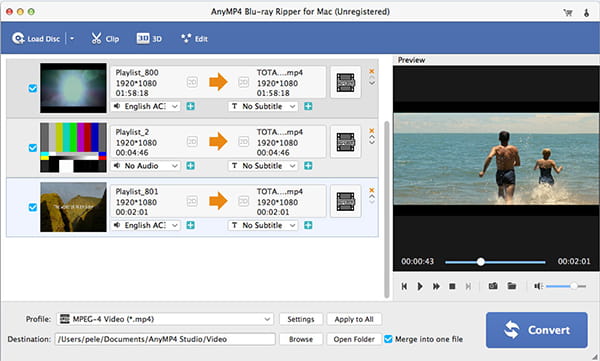
This is an easy to operate Mac Blu-ray to iPod ripping software with intuitive and graphic interface. Just a few of clicks can finish the whole converting process.

Super Fast
It has the advanced decoding and encoding technology to convert Blu-ray to iPod video on Mac with accelerated speed and perfect output video/audio/image quality.
Screenshot
Reviews
Reference
Processor: Intel® processor and M1&M2 chip
OS Supported: Mac OS 10.12 (Sierra) or later (including macOS Sonoma)
Hardware Requirements: 512MB RAM, Super VGA (800×600) resolution, 16-bit graphics card or higher
| Support Input File Formats | |
| Blu-ray | Blu-ray Disc, Blu-ray Folder |
| Support Output File Formats | |
| Video | MTS, TS, M2TS, TP, TRP, HD MPG, HD MPEG, HD MPEG2, HD MPEG4, HD MP4, HD WMV, QuickTime HD MOV, TS, MTS, M2TS, MXF, TRP, TP, MP4, M4V, QT, MOV, MPG, MPEG, MPEG2, MPEG4, MJPG, MJPEG, AVI, 3GP, 3G2, FLV, MOD, TOD, RM, RMVB, WMV, ASF, MKV, SWF, F4V, VOB, DAT, DV, DIF, WebM |
| Audio | FLAC, WAV, WMA, MP3, MP2, AAC, AC3, AIFF, APE, CAF, MPC, QCP, OGG, M4A, M4B, AUD, MKA, AIFC, RA, RAM, AU, AIF, CUE |
| Snapshot Image | JPEG, GIF, BMP |
| Support Devices | |
| iPad (iPad Pro, iPad mini 4, iPad Air 2), iPhone (iPhone 15/15 Plus/15 Pro/15 Pro Max, iPhone 14/14 Plus/14 Pro/14 Pro Max, iPhone 13/13 Pro/13 Pro Max/13 mini, iPhone 12 Pro Max/12 Pro/12/12 mini, iPhone 11 Pro Max, iPhone 11 Pro, iPhone 11, iPhone XS, iPhone XS Max, iPhone XR, iPhone X, iPhone 8/8 Plus, iPhone 7/7 Plus, iPhone 6/6 Plus), iPod (iPod touch, iPod nano, iPod classic), Apple TV Android devices: Samsung, HTC, Motorola, LG, Acer, Dell Mobile phones: BlackBerry, Nokia, Motorola, LG, Sony Ericsson, Sony Xperia, Sony Walkman NDS, PSP, PS3, Wii, Xbox 360 Archos, Creative ZEN, iRiver, Sony Walkman, ZEN Player, Zune, Sansa General Pocket PC, HP iPAQ, Palm Pre, etc. |
|
Our Users Are Also Downloading
 Blu-ray Player for Mac
Play Blu-ray movies including Blu-ray discs, Blu-ray folder and ISO file on Mac.
Free Download Buy Now DVD Creator for Mac
Provides the best solution to convert any video format to DVD disc, DVD folder and ISO file on Mac.
Free Download Buy Now