4Videosoft DVD to 3GP Converter for Mac is the ideal Mac DVD to 3GP Converter providing the best solution to convert homemade DVD to 3GP format on Mac. The converted 3GP video can be played on various mobile phones like BlackBerry, Gphone, Palm Pre, Motorola, LG, Samsung, Nokia, etc. Also you can use this program to convert DVD to MP4, WMV, AVI, MOV, etc. Samsung Galaxy S3/S4, Samsung Galaxy Note 2, etc.
To have a better playing effect, this Mac DVD to 3GP program provides a variety of editing features to help you customize the output video so that you can adjust the video visual effect, trim video length, crop video frame, add watermark, etc. for your preference.

With 4Videosoft DVD to 3GP Converter for Mac, it is easy for you to achieve the goal to convert homemade DVD movies to 3GP so as to playback on mobile phones. It allows you to convert homemade DVD to 3GP and other video/audio like MP4, WMV, AVI, MOV, MP3, AAC, M4R, etc. with ease.
To enjoy the marvelous DVD movies on your mobile phones like Samsung, BlackBerry, Palm Pre, LG, Nokia and other mobile devices, you can use this DVD to 3GP Converter for Mac to convert homemade DVD to the mobile phones supported 3GP video on Mac OS. Also it can convert homemade DVD to MP4, WMV, AVI, etc. for Samsung Galaxy S4 and other portable devices.

Change Video Effect
It is easy to customize the video visual effect by adjusting the brightness, contrast, saturation and hue.

Crop Video Frame
Crop the black sides and adjust the aspect ratio to play the converted 3GP movies properly on your mobile phone.

Trim Video length
Cut the source DVD to clip the exact part and convert to 3GP according to your need.

Merge DVD chapters/titles together
Merge DVD chapters/titles together You are allowed to join several DVD chapters/titles and convert into one long movie.

Add Watermark
To personalize or protect your movie, you can add text or image watermark and adjust the font, size, color, position and transparency of the watermark.

Set Output Parameters
This Mac DVD to 3GP Converter provides more video and audio parameters for you to choose, including encoder, resolution, frame rate, bitrate, sample rate, channels, etc.

Preview and Snapshot
The built-in player with this Mac DVD to 3GP program enables you to preview the movies and take snapshot of the favorite scene to save as JPG, GIF and BMP.

Easy to use
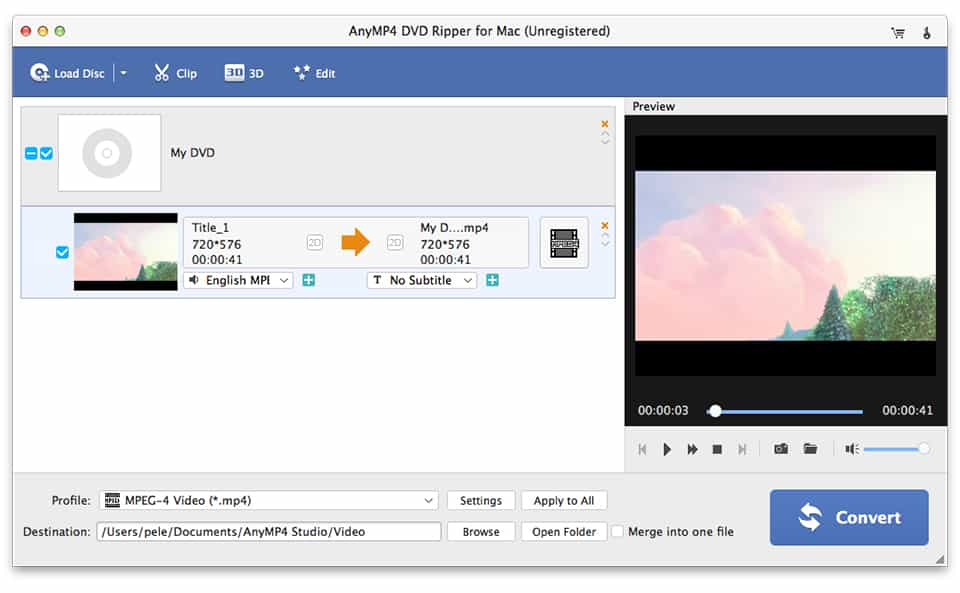
4Videosoft DVD to 3GP Converter for Mac has the intuitive interface. And just a few of simple clicks can do the DVD to 3GP conversion on Mac. Then you can enjoy them on your mobile phone.
Screenshot
Reference
Processor: Intel® processor and M1&M2 chip
OS Supported: Mac OS 10.12 (Sierra) or later (including macOS Sonoma)
Hardware Requirements: 512MB RAM, Super VGA (800×600) resolution, 16-bit graphics card or higher
| Support Input File Formats | |
| DVD | DVD Disc, DVD Folder, DVD IFO Files |
| Support Output File Formats | |
| HD Video | TS, HD MP4, HD AVI, HD MOV, HD ASF, HD H.264/MPEG-4 AVC, HD MPEG-4, MPEG-2 HD, HD MKV, HD MPG, HD MPEG-4 TS, MPEG-2 TS HD, HD H.264 TS, DivX HD, XviD HD, YouTube HD, HD FLV, HD WMV, HD VOB, HD WebM |
| Video | MPG, MPEG-1, MPEG-2, MPEG-4, H.264, H.264/MPEG-4 AVC, DivX, XviD, AVI, FLV, MP4, M4V, MKV, MOV, 3GP, 3G2, MTV, SWF, WMV, WMV-2, ASF, DPG, TS, DV, VOB, AMV, ProRes Proxy, ProRes LT, ProRes Standard, ProRes HQ, WebM |
| Audio | FLAC, WAV, WMA, AAC, ALAC, AC3, AIFF, AMR, AU, MP3, MP2, M4A, MKA, OGG |
| Support Devices | |
| iPad (iPad Pro, iPad mini 4, iPad Air 2), iPhone (iPhone 15/15 Plus/15 Pro/15 Pro Max, iPhone 14/14 Plus/14 Pro/14 Pro Max, iPhone 13/13 Pro/13 Pro Max/13 mini, iPhone 12 Pro Max/12 Pro/12/12 mini, iPhone 11 Pro Max/11 Pro/11, iPhone XS/XS Max, iPhone XR/X, iPhone 8/8 Plus, iPhone 7/7 Plus, iPhone 6/6 Plus), iPod (iPod touch, iPod nano, iPod classic), Apple TV Android devices: Samsung, HTC, Motorola, LG, Acer, Dell Mobile phones: BlackBerry, Nokia, Motorola, LG, Sony Ericsson, Sony Xperia, Sony Walkman NDS, PSP, PS3, Wii, Xbox 360 Archos, Creative ZEN, iRiver, Sony Walkman, ZEN Player, Zune, Sansa General Pocket PC, HP iPAQ, Palm Pre, etc. |
|
Our Users Are Also Downloading
 Blu-ray Player for Mac
Play Blu-ray movies including Blu-ray discs, Blu-ray folder and ISO file on Mac.
Free Download Buy Now DVD Creator for Mac
Provides the best solution to convert any video format to DVD disc, DVD folder and ISO file on Mac.
Free Download Buy Now