User Review (3)  Go to Win ->
$31.20 $15.60 50% OFF
DVD to iRiver Converter for Mac is best Mac DVD converter software for iRiver, which can convert your homemade DVD movies to iRiver videos on Mac. You also can extract audios from homemade DVD with excellent quality.
This DVD to iRiver Converter for Mac allows you to set output video effect, trim and crop DVD video, merge several DVD chapters into one, and add text or picture watermark. All these help you get different video output.

DVD to iRiver Converter for Mac is a powerful and professional Mac DVD to iRiver software provides both Power PC and Intel versions for all Mac users.
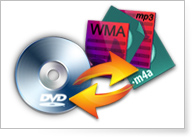
This Mac DVD Converter to iRiver can be used to convert homemade DVD to iRiver compatible formats: MV, AVI, MP4, H.264/MPEG-4 AVC (.mp4), M4A, MP3, OGG, and etc.
DVD to iRiver Converter for Mac supports any iRiver players, including iRiver X20, iRiver B20, iRiver Clix, iRiver SIREN, and so on.

You can change the video effect by adjusting its Brightness, Contrast, Saturation and Volume.
You can get any video time length by setting the exact start time and end time, or just drag the slide bar.
Adjust aspect ratio and cut off the unwanted parts of video to get the suitable play screen for you player with crop function.
Join your separated DVD sources into one file for you to enjoy successively.
Add watermark for your output video. You can adjust the watermark Horizontal position, Vertical position and Transparent.
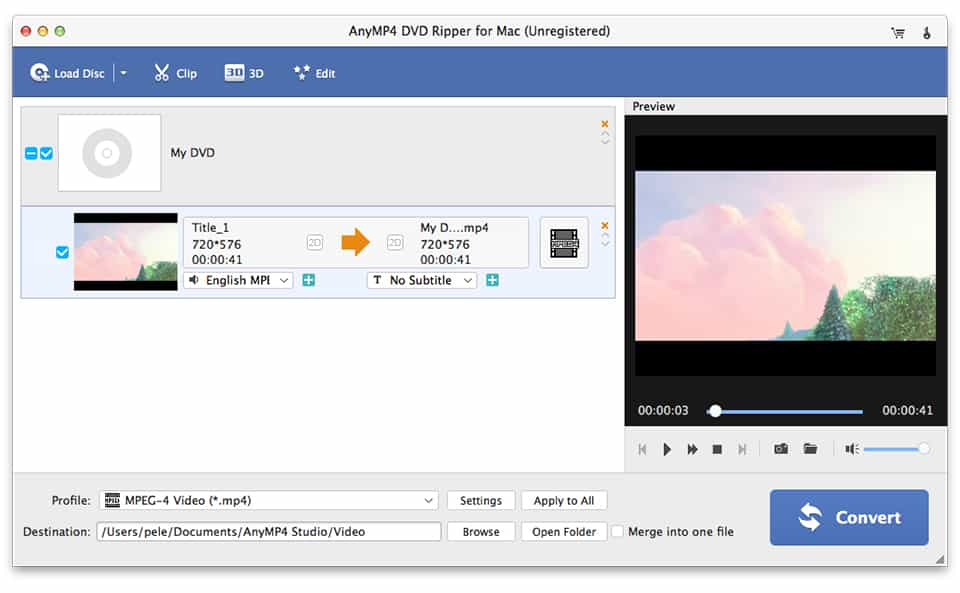
Choose audio track and subtitle you want, or choose no subtitle based on your needs.
You can choose Video Encoder, Resolution, Frame Rate, Video Bitrate and Audio Encoder, Sample Rate, Channels, Audio Bitrate. You also can input Video Resolution in the form of Width (pixels)*Height (pixels). All these setting can be saved as user-defined profile.

DVD to iRiver Converter for Mac helps you convert files quickly with high output quality, and really makes your conversion smooth and efficient.
Supply users with fresh and clear-cut interface. You can do any operation only by clicking the clearly designed buttons.
Screenshot
Reviews
Reference
Processor: Intel® processor and M1&M2 chip
OS Supported: Mac OS 10.12 (Sierra) or later (including macOS Sonoma)
Hardware Requirements: 512MB RAM, Super VGA (800×600) resolution, 16-bit graphics card or higher
| Support Input File Formats | |
| DVD | DVD Disc, DVD Folder, DVD IFO Files |
| Support Output File Formats | |
| HD Video | TS, HD MP4, HD AVI, HD MOV, HD ASF, HD H.264/MPEG-4 AVC, HD MPEG-4, MPEG-2 HD, HD MKV, HD MPG, HD MPEG-4 TS, MPEG-2 TS HD, HD H.264 TS, DivX HD, XviD HD, YouTube HD, HD FLV, HD WMV, HD VOB, HD WebM |
| General Video | MPG, MPEG-1, MPEG-2, MPEG-4, H.264, H.264/MPEG-4 AVC, DivX, XviD, AVI, FLV, MP4, M4V, MKV, MOV, 3GP, 3G2, MTV, SWF, WMV, WMV-2, ASF, DPG, TS, DV, VOB, AMV, WebM |
| Audio | FLAC, WAV, WMA, AAC, AC3, AIFF, AMR, AU, MP3, MP2, M4A, MKA, OGG |
| Support Devices | |
| iPad (iPad Pro, iPad mini 4, iPad Air 2), iPhone (iPhone 15/15 Plus/15 Pro/15 Pro Max, iPhone 14/14 Plus/14 Pro/14 Pro Max, iPhone 13/13 Pro/13 Pro Max/13 mini, iPhone 12 Pro Max/12 Pro/12/12 mini, iPhone 11 Pro Max/11 Pro/11, iPhone XS/XS Max, iPhone XR/X, iPhone 8/8 Plus, iPhone 7/7 Plus, iPhone 6/6 Plus), iPod (iPod touch, iPod nano, iPod classic), Apple TV Android devices: Samsung, HTC, Motorola, LG, Acer, Dell Mobile phones: BlackBerry, Nokia, Motorola, LG, Sony Ericsson, Sony Xperia, Sony Walkman NDS, PSP, PS3, Wii, Xbox 360 Archos, Creative ZEN, iRiver, Sony Walkman, ZEN Player, Zune, Sansa General Pocket PC, HP iPAQ, Palm Pre, etc. |
|
Our Users Are Also Downloading
 Blu-ray Player for Mac
Play Blu-ray movies including Blu-ray discs, Blu-ray folder and ISO file on Mac.
Free Download Buy Now DVD Creator for Mac
Provides the best solution to convert any video format to DVD disc, DVD folder and ISO file on Mac.
Free Download Buy Now