User Review (2)  Go to Win ->
$25.00 $12.50 50% OFF
Flip Movie Converter for Mac is one professional Mac Flip Movie Converter which is capable of converting Flip movie to other popular video formats on Mac, like convert Flip movie to AVI on Mac, convert Flip movie to WMV on Mac. This best Mac Flip Movie Converter accepts any input video created by all Flip series and abundant output video/audio files like AVI, WMV, 3GP, MKV, FLV, SWF, VOB… video and MP3, M4V, MP2, OGG, WAV, WMA… audio.
Besides, Flip Movie Converter for Mac offers series of editing functions to customize your video effect, like adjusting video brightness, contrast and saturation, setting output parameters, merging files, watermarking video, capturing pictures from video, etc.

Flip Movie Converter for Mac easily converts Flip movie to AVI, WMV, 3GP, MKV, FLV, SWF, VOB… video.
Flip Movie Converter for Mac easily converts Flip movie to MP3, M4V, MP2, OGG, WAV, WMA… audio on Mac

Flip Movie Converter for Mac can conveniently get any part of source Flip video to convert by specifying the start and end time or just dragging slider bar.
Click Crop button to adjust the size of video play region to suit your player.
The merge function provided by Flip Movie Converter for Mac can combine several separated files to a successive one.
Flip Movie Converter for Mac can also play a role of video watermarker to help you add a watermark to your video.
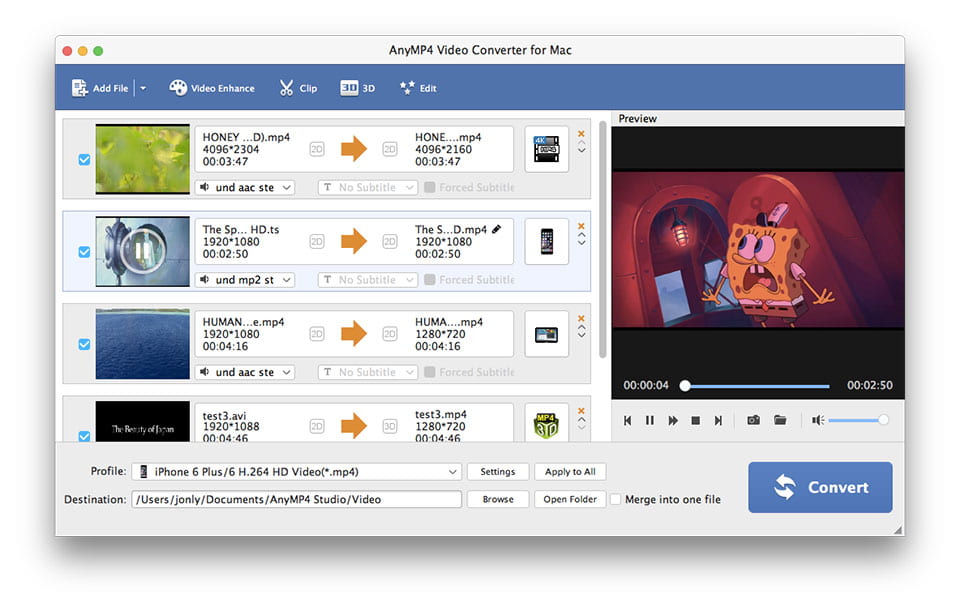
With Flip Movie Converter for Mac, you can convert one file to different output formats simultaneously.
You are allowed to choose you needed audio track and subtitle.
Modify video Encoder, Resolution, Frame Rate, Video Bitrate and audio Encoder, Sample Rate, Channels, Audio Bitrate in Settings window.

Flip Movie Converter for Mac can effectively improve interlaced video effect by checking Deinterlacing.
Flip Movie Converter for Mac is definitely easy to use. Users can finish the whole conversion process within several minutes.
Provide the fastest conversion speed (>300%), completely support dual core CPU.
Screenshot
Reviews
Reference
Processor: Intel® processor and M1&M2 chip
OS Supported: Mac OS X 10.7 or later (including macOS Sonoma)
Hardware Requirements: 512MB RAM, Super VGA (800×600) resolution, 16-bit graphics card or higher
| Support Input File Formats | |
| Video | MPG, MPEG, MPEG 2, VOB, DAT, MP4, M4V, TS, RM, RMVB, WMV, ASF, MKV, AVI, 3GP, 3G2, FLV, SWF, MPV, MOD, TOD, QT, MOV, DV, DIF, MJPG, MJPEG |
| HD Video | HD TS, HD MTS, HD M2TS, HD MPG, HD MPEG, HD MP4, HD WMV, QuickTime HD MOV, HD H.264, HD RM |
| Audio | MP3, MP2, AAC, AC3, WAV, WMA, M4A, RM, RAM, OGG, AU, AIF, AIFF, APE, FLAC, NUT |
| Support Output File Formats | |
| Video | AMV, MP4, ASF, AVI, 3GP, WMV, DV, VOB, FLAC, FLV, MKV, MOV, TS, M4V, 3G2, MPG, MTV, DPG, SWF, DivX, XviD |
| 3D video | MP4 Side by Side 3D, MP4 Top and Bottom 3D, MP4 Anaglyph 3D, MKV Side by Side 3D, MKV Top and Bottom 3D, MKV Anaglyph 3D, TS Side by Side 3D, TS Top and Bottom 3D, TS Anaglyph 3D, AVI Side by Side 3D, AVI Top and Bottom 3D, AVI Anaglyph 3D, FLV Side by Side 3D, FLV Top and Bottom 3D, FLV Anaglyph 3D |
| Audio | AAC, AC3, AIFF, AMR, AU, M4A, MKA, MP3, MP2, OGG, WAV, WMA |
| Snapshot Image | JPEG, GIF, BMP |
| Support Devices | |
| iPad (iPad Pro, iPad mini 4, iPad Air 2), iPhone (iPhone 15/15 Plus/15 Pro/15 Pro Max, iPhone 14/14 Plus/14 Pro/14 Pro Max, iPhone 13/13 Pro/13 Pro Max/13 mini, iPhone 12 Pro Max/12 Pro/12/12 mini, iPhone 11 Pro Max/11 Pro/11, iPhone XS/XS Max, iPhone XR/X, iPhone 8/8 Plus, iPhone 7/7 Plus, iPhone 6/6 Plus), iPod (iPod touch, iPod nano, iPod classic), Apple TV Android devices: Samsung, HTC, Motorola, LG, Acer, Dell Mobile phones: BlackBerry, Nokia, Motorola, LG, Sony Ericsson, Sony Xperia, Sony Walkman NDS, PSP, PS3, Wii, Xbox 360 Archos, Creative ZEN, iRiver, Sony Walkman, ZEN Player, Zune, Sansa General Pocket PC, HP iPAQ, Palm Pre, etc. |
|
Our Users Are Also Downloading
 Video Converter Ultimate for Mac
Rip homemade DVD and convert videos to other formats on Mac.
Free Download Buy Now DVD Creator for Mac
Provides the best solution to convert any video format to DVD disc, DVD folder and ISO file on Mac.
Free Download Buy Now Blu-ray Player for Mac
Play Blu-ray movies including Blu-ray discs, Blu-ray folder and ISO file on Mac.
Free Download Buy Now