
M2TS Converter is a professional and all-in-one M2TS to SWF Converter which can not only convert M2TS to SWF with ease. The M2TS to SWF converting software also supports converting M2TS to other video/HD files like M2TS to MOV, XviD, even HD H.264, HD AVI and more. When converting M2TS to SWF, you can select the video and audio codec, set the output parameters.
What you need?
Software: M2TS Converter
OS Supported: Windows 8, Windows 7, Windows XP (SP2 or later), Windows Vista
Hardware Requirements: 800MHz Intel or AMD CPU, or above; 512MB RAM or more
Step 1 Click Add file button
Free download this professional M2TS converter, install and run it on your PC. You will see the easy-to-use interface
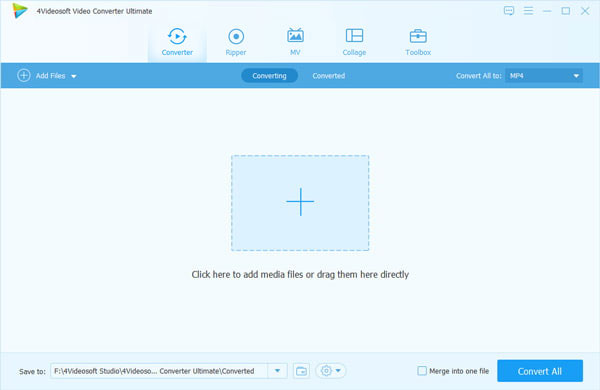
Click "Add file" button to add the M2TS files you want to convert. You can check them in the file list.
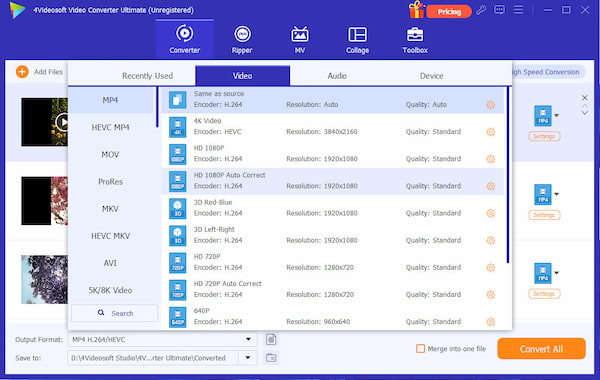
Step 2 Output format and output folder
Set ouput format SWF - SWF Format (*.swf) by clicking "Down-narrow". "Browse" to choose a path to store your converted files.
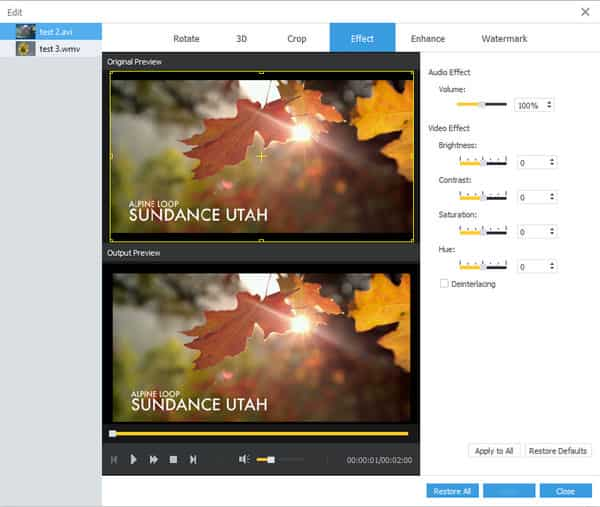
Edit video:
Effect -- Here you have three options to change the output image quality. Move the sliders of brightness, contrast, saturation.
Step 3 Conversion
Conversion started after hitting Start button. Only a few seconds after, you can enjoy your converted files at will!
It is so easy to convert M2TS to SWF. Don't hesitate any more, just free download this M2TS to SWF converter to have a wonderful try.

 Free Download
 Free Download


