
"MKV" is an open standard free Container format which can hold an unlimited number of video, audio, picture or subtitle tracks inside a single file. Hope to play your favorite TS on your player which supports MKV format? Ok, you're right here. You need to convert TS to MKV files first with this TS to MKV Converter and then play the converted files. Moreover, it also can convert TS to MP4, iPod, Apple TV, iPhone, Zune, etc. And now, how to easily convert TS files directly to MKV format fast? TS to MKV Converter can display its special functions to you.
Software: 3D Converter
OS Supported: Windows 8, Windows 7, Windows XP (SP2 or later), Windows Vista
Hardware Requirements: 800MHz Intel or AMD CPU, or above; 512MB RAM or more
Step 1 Load the TS files you want to convert
Drag and drop the TS files to the program or you can click the "Add File" button to browse your computer and add the TS files you want to convert to the program. You can load several TS files at one time and preview them one by one.
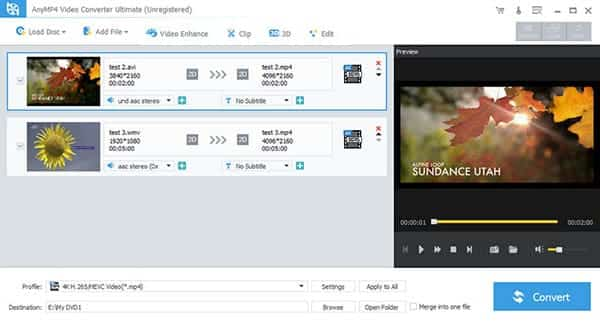
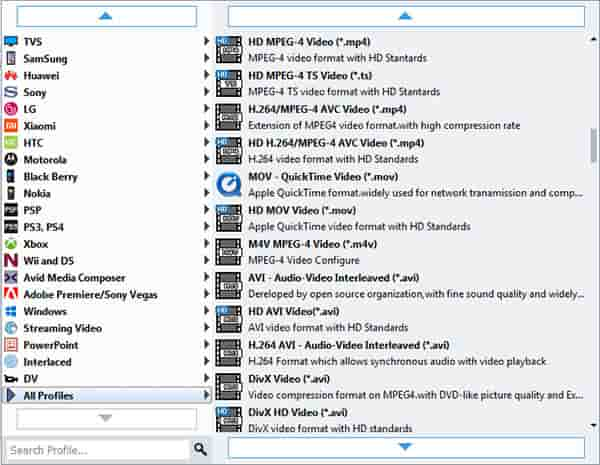
Step 2 Select output format from list
Choose MKV - MKV video format from output format list and the resulting files look quite nice on your player screen. And specify a directory on your computer to save the output files.
Step 3 Hit Start to start converting
Click "Convert" button to complete TS to MKV conversion. This smart TS to MKV Video Converter can automatically switch off the computer when the conversion is done, so you don't need to wait around during the conversion.

 Free Download
 Free Download


