
TS to MPEG Converter can convert TS to MPEG format files with perfect quality and fast conversion speed. Besides MPEG, this TS to MPEG Converter also can convert TS to AVI, FLV, WMV, MOV, MPG, MP4, MP3, WMA and other common format files for iPod, PSP, iPhone, Apple TV, etc. However, TS to MPEG Converter has a friendly interface. You can easily convert the TS file to MPEG files with a few clicks.
Download and explore this TS to MPEG Converter.
Software: 3D Converter
OS Supported: Windows 8, Windows 7, Windows XP (SP2 or later), Windows Vista
Hardware Requirements: 800MHz Intel or AMD CPU, or above; 512MB RAM or more
Step 1 Load TS video
Select TS files as your source files from dialog box that opens after clicking Add file, and add them to the file list.
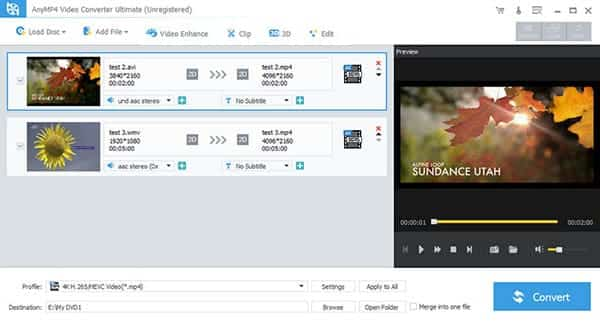
Step 2 Select output format and output folder
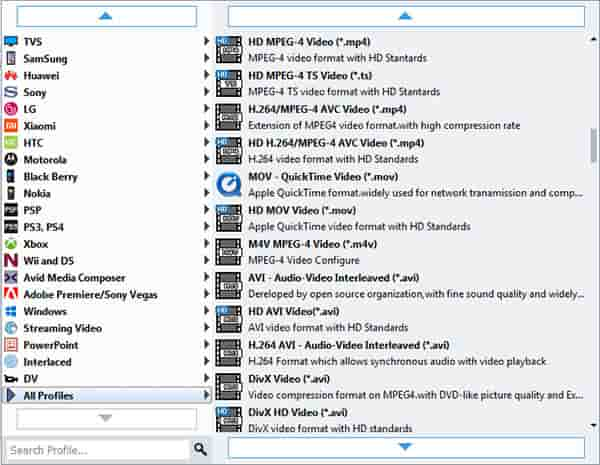
Open "Profile" drop-down list, then select an output format MPEG for selected files. Click Browse to specify a location on your computer to save the converted movie. If you want to open the output folder, you can just click Open Folder.
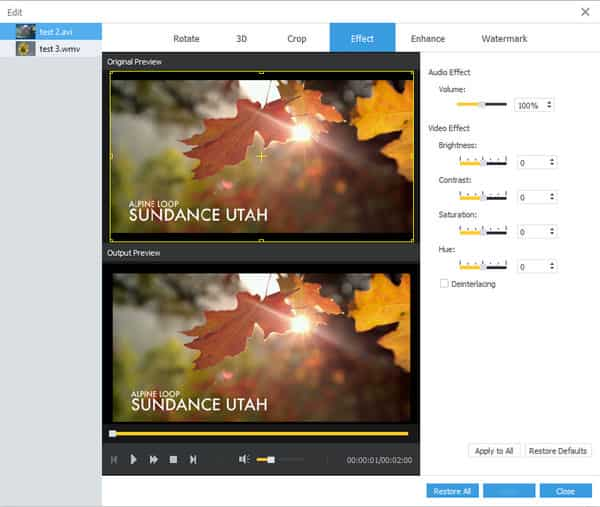
Additional
If you are a video fan and you wish to do more with this converter, there are bunch of professional features available behind the main interface.
Step 3 TS to MPEG converting
Click "Convert" button, TS to MPEG Converter will start converting TS videos automatically. After clicking, you can see the converting progress window for references.
Once the conversion is OK, you can get the converted MPEG files and enjoy them with popular players. Free download TS to MPEG Converter and have a wonderful experience right now!

 Free Download
 Free Download


