User Review  Go to Mac ->
$37.50 $18.75 50% OFF
As the highly recommended Blu-ray ripping software, Blu-ray Ripper can help you professionally rip Blu-ray disc to all popular video and audio formats.
Moreover, Blu-ray Ripper possesses powerful editing functions, which helps you optimize the output video by modifying video effect, trimming video length, cropping video frame, adding video watermark, etc.


Blu-ray Ripper can rip Blu-ray disc to any video and audio formats, like MP4, MPG, ASF, MKV, FLV, 3GP, MP3, AAC, AC3, MKA, M4A, etc.
This Blu-ray Ripper helps you rip Blu-ray to various digital players, including iPad mini 2/3, iPad Air, iPhone, iPod, Apple TV, PSP, Creative Zen, Zune, and so on.

Blu-ray Ripper allows you to adjust video Brightness, Contrast, Saturation so as to get the personalized video effect. You can also add text or picture watermark for your output video.
Set the exact start time and end time you want for you to get the favorite video length from the source video.
For to get the continuous video, Blu-ray Ripper can help you join several Blu-ray movie chapters together into one file.
With Blu-ray Ripper, you can change the video play screen by cutting off the unwanted black edges and adjusting video aspect ratio.

Blu-ray Ripper allows you to choose the subtitle and audio track for your output video. You can also choose to output video without subtitle.
You can select the suitable video and audio output format for your player.
Detailed video settings and audio settings are provided for you to choose, such as Video Encoder, Resolution, Frame Rate, Video Bitrate, and Audio Encoder, Sample Rate, Channels and Audio Bitrate.

With Blu-ray Ripper's help, you can preview both the original video and output video. And you can click"Snapshot" to catch your favorite pictures.
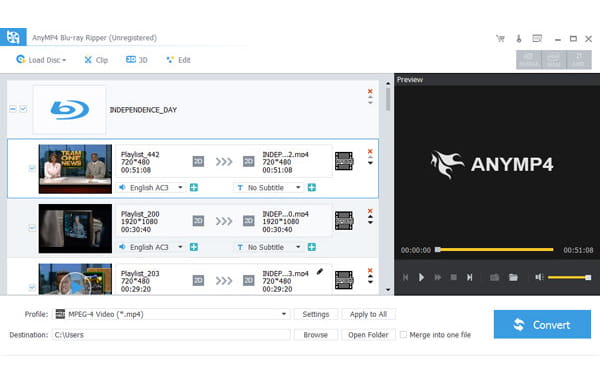
This Blu-ray Ripper has the clear-cut interface, which makes your operation easy and convenient.
The advanced NVIDIA® CUDA™ and AMD APP technology of Blu-ray Ripper can totally accelerate your conversion speed.
Screenshot
Reviews
Reference
OS Supported: Windows 11/10/8.1/8/7 (32-bit/64-bit)
CPU: 1GHz Intel/AMD CPU or above
RAM: 2GB RAM or above
| Support Input File Formats | |
| Blu-ray | Blu-ray Disc, Blu-ray Folder |
| Support Output File Formats | |
| Video | MTS, TS, M2TS, TP, TRP, HD MPG, HD MPEG, HD MPEG2, HD MPEG4, HD MP4, HD WMV, QuickTime HD MOV, TS, MTS, M2TS, MXF, TRP, TP, MP4, M4V, QT, MOV, MPG, MPEG, MPEG2, MPEG4, MJPG, MJPEG, AVI, 3GP, 3G2, FLV, MOD, TOD, RM, RMVB, WMV, ASF, MKV, SWF, F4V, VOB, DAT, DV, DIF, WebM |
| Audio | FLAC, WAV, WMA, MP3, MP2, AAC, AC3, AIFF, APE, CAF, MPC, QCP, OGG, M4A, M4B, AUD, MKA, AIFC, RA, RAM, AU, AIF, CUE |
| Snapshot Image | JPEG, GIF, BMP |
| Support Devices | |
| iPad (iPad Pro, iPad mini 4, iPad Air 2), iPhone (iPhone 14/14 Plus/14 Pro/14 Pro Max, iPhone 13/13 Pro/13 Pro Max/13 mini, iPhone 12 Pro Max/12 Pro/12/12 mini, iPhone 11 Pro Max, iPhone 11 Pro, iPhone 11, iPhone XS, iPhone XS Max, iPhone XR, iPhone X, iPhone 8/8 Plus, iPhone 7/7 Plus, iPhone 6/6 Plus, etc.), iPod (iPod touch, iPod nano, iPod classic), Apple TV Android devices: Samsung, HTC, Motorola, LG, Acer, Dell Mobile phones: BlackBerry, Nokia, Motorola, LG, Sony Ericsson, Sony Xperia, Sony Walkman NDS, PSP, PS3, Wii, Xbox 360 Archos, Creative ZEN, iRiver, Sony Walkman, ZEN Player, Zune, Sansa General Pocket PC, HP iPAQ, Palm Pre, etc. |
|
Tutorials & Articles
Our Users Are Also Downloading
 Blu-ray Player
Play Blu-ray movies including Blu-ray discs, Blu-ray folder and ISO file on PC.
Free Download Buy Now DVD Creator
Provides the best solution to convert any video format to DVD disc, DVD folder and ISO file.
Free Download Buy Now