User Review (1)  Go to Mac ->
$37.50 $18.75 50% OFF
Desire to watch the wonderful and high-definition Blu-ray movies with Windows Media Player on your computer? Or want to enjoy the Blu-ray file on your portable PSP, PS3, Xbox, BlackBerry, iRiver and more? Blu-ray to MPEG Ripper provides the best way to rip the Blu-ray disc, Blu-ray folder and Blu-ray ISO file to MPEG/MPEG-4/MPEG-2/MPEG-1 with the extension of .mpg, .mp4, .vob, .ts, etc. Also this amazing Blu-ray to MPEG converter can rip Blu-ray to other general and HD videos like AVI, MOV, FLV, DivX, XviD and WebM.
In addition, with this versatile software, you can rip DVD and convert all popular video files to MPEG video keeping the high original quality. And it offers various video editing tools to customize the output MPEG video for your need.

Blu-ray to MPEG Ripper provides the practical solution for ripping Blu-ray contents including disc, folder and ISO file to MPEG on Windows. You can easily get any MPEG video with the extension of .mpg, .mp4, .vob, .ts, etc. from Blu-ray movies for you to play the Blu-ray movies on PSP, PS3, Xbox360, iRiver, BlackBerry, Archos, Creative Zen, YouTube and other devices and video websites.
Also this program can help you convert DVD and video files to output MPEG and other videos and extract audio from Blu-ray/DVD/video to convert to MP3, AAC, WAV and ALAC.
With this amazing program, you can fully enjoy the wonderful HD movies everywhere you go on your portable devices.

Rip the specific part MPEG video
If you just want to convert the certain part of the Blu-ray movie to MPEG, you can set the start and end time of the part you want to save so as to convert the video correctly and exactly. There are three ways for you to set the start point and end point.

Define the output video screen size
To have the proper video screen size to playback on your player, this program enables you to cut off the unwanted black bars and adjust the aspect ratio and zoom mode at the "Crop" editing window. You can select the aspect ratio from Full Screen, Keep Original, 16:9 and 4:3.

Re-design the video effect for your preference
The best Blu-ray to MPEG ripping software allows you to change the video effect at will. It is easy for you to adjust the brightness, contrast, saturation, hue and volume to customize it for your need.

Add watermark to protect video's copyright
To protect your video from being copied, you can add your own watermark in the format of text or image. And it allows you to adjust the font, size, color, position and transparency of the watermark.

More special and user-friendly features
This program can assist you to merge several Blu-ray/DVD/video chapters/titles/segments together and convert to one long MPEG video so that you can enjoy the favorite Blu-ray movies continuously. And the built-in player with this program enables you to preview the source movie and ripped MPEG video in real-time, which is convenient for output a better effect video.

Easy-to-use and super-fast Blu-ray to MPEG software
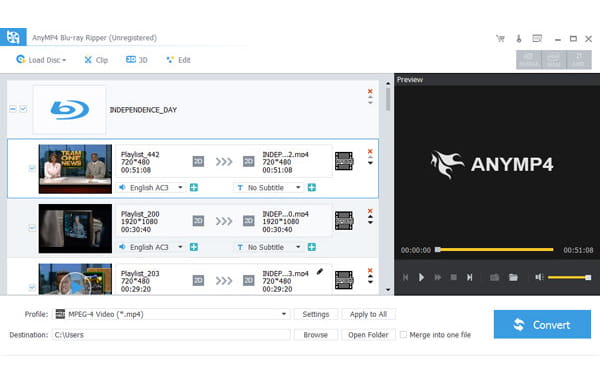
Blu-ray to MPEG Ripper is the ideal converter software having the intuitive and graphic interface as well as simple Blu-ray ripping process. It is easy for both advanced users and beginners to complete the Blu-ray to MPEG conversion easily. And the advanced technology provides the fastest speed to rip Blu-ray to MPEG video with high quality.
Screenshot
Reviews
Reference
OS Supported: Windows 11, Windows 10, Windows 8/8.1, Windows 7
Hardware Requirements: 800MHz Intel or AMD CPU, or above; 512MB RAM or more
| Support Input File Formats | |
| Blu-ray | Blu-ray Disc, Blu-ray Folder |
| Support Output File Formats | |
| Video | AMV, MP4, 3GP, 3G2, AVI,WMV, ASF, DV, VOB, FLAC, FLV, 3G2, MKV, TS, M4V, MOV, MPG, MTV, DPG, SWF, H.264/MPEG4, MPEG-4, DivX, XviD |
| Audio | AAC, AC3, AIFF, AMR, AU, M4A, MKA, MP3, MP2, OGG, WAV, WMA |
| Snapshot Image | JPEG, GIF, BMP |
| Support Devices | |
| iPad (iPad Air 2, iPad mini 3), iPhone (iPhone 17/Air/17 Pro/17 Pro Max, iPhone 16/16 Plus/16 Pro/16 Pro Max, iPhone 15/15 Plus/15 Pro/15 Pro Max, iPhone 14/14 Plus/14 Pro/14 Pro Max, iPhone 13/13 Pro/13 Pro Max/13 mini, iPhone 12 Pro Max/12 Pro/12/12 mini, iPhone 11 Pro Max/11 Pro/11, iPhone XS/XS Max, iPhone XR/X, iPhone 8/8 Plus, iPhone 7/7 Plus, iPhone 6/6 Plus), iPod (iPod touch, iPod nano, iPod classic), Apple TV Android devices: Samsung, HTC, Motorola, LG, Acer, Dell Mobile phones: BlackBerry, Nokia, Motorola, LG, Sony Ericsson, Sony Xperia, Sony Walkman NDS, PSP, PS3, Wii, Xbox 360 Archos, Creative ZEN, iRiver, Sony Walkman, ZEN Player, Zune, Sansa General Pocket PC, HP iPAQ, Palm Pre, etc. |
|
Our Users Are Also Downloading
 Blu-ray Player
Play Blu-ray movies including Blu-ray discs, Blu-ray folder and ISO file on PC.
Free Download Buy Now DVD Creator
Provides the best solution to convert any video format to DVD disc, DVD folder and ISO file.
Free Download Buy Now