User Review (1)  Go to Mac ->
$31.20 $15.60 50% OFF
DVD to BlackBerry Converter is the professional yet easy-to-use DVD to BlackBerry converting software, having the ability to convert homemade DVD movies to BlackBerry supported MP4, AVI, WMV, 3GP, etc. with zero loss quality.
With this excellent DVD to BlackBerry program, you can also extract audio from homemade DVD and convert to MP3, AAC, M4A, WMA, etc. Before converting, it enables you to optimize the video with various editing features like effect, trim, crop, merge, watermark, etc.

As the special-designed DVD to BlackBerry software, DVD to BlackBerry Converter can easily convert homemade DVD disc, DVD folder and ISO file to MP4, AVI, WMV and 3GP for different versions of BlackBerry including BlackBerry,BlackBerry Z10, BlackBerry Q10, BlackBerry Storm, BlackBerry Bold, BlackBerry Pear, BlackBerry Torch, etc.
Additionally, this DVD to BlackBerry ripper provides an easy solution to extract audio from homemade DVD and convert to MP3, WMA, M4A, AAC and ARM.

Adjust BlackBerry Video Effect
With this magic DVD to BlackBerry Converter, you are easy to adjust the color of the source DVD before converting BlackBerry video. You can adjust many aspects of the color including brightness, saturation, contrast and hue. Also it allows you to change the video volume.

Crop the Video Frame Suitable for Your Mobile Phone
With the DVD to 3GP Converter, the boring black edges of the source DVD can be removed easily so as to have better movie enjoyment on mobile phone. It allows you to adjust the aspect ratio and zoom mode

Trim the Video Length
It is easy for you to clip the specific video part from source DVD by setting the exact start and end time. Also you can just drag the slider bars to finish trimming video.

Add Video Watermark
To make your BlackBerry video special and personalized, you can add text or image watermark before ripping to BlackBerry video. And it allows you to define the color, size, font, position and transparency of the watermark.

Merge DVD Chapters
The DVD to BlackBerry Converter has the function to join several DVD chapters together and convert them to output one BlackBerry video so that you can enjoy the DVD movies continuously with much more fun.

Take Snapshot
This software has the built-in player helping users preview the DVD movies and converted BlackBerry video. Meanwhile, you can take snapshot of the scenes you preferred and save them as image JPG, GIF and BMP.

Convert DVD to BlackBerry Rapidly
With the advanced decoding and encoding technology, DVD to BlackBerry Converter provides the best solution to convert homemade DVD to BlackBerry with fastest speed.

User Friendly
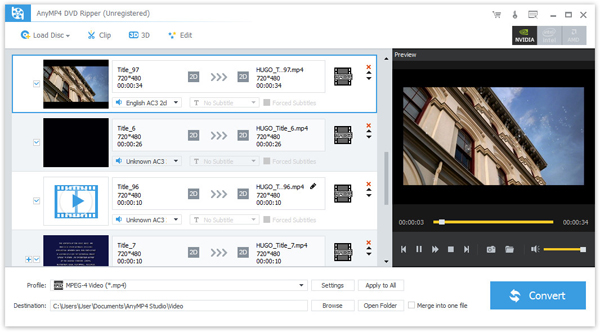
This program has the intuitive and graphic interface. It is easy to use for each user even the ones who first use this program.
Screenshot
Reviews
Reference
OS Supported: Windows 11, Windows 10, Windows 8/8.1, Windows 7
Hardware Requirements: 800MHz Intel or AMD CPU, or above; 512MB RAM or more
| Support Input File Formats | |
| DVD | DVD Disc, DVD Folder, DVD IFO Files |
| Support Output File Formats | |
| HD Video | TS, HD MP4, HD AVI, HD MOV, HD ASF, HD H.264/MPEG-4 AVC, HD MPEG-4, MPEG-2 HD, HD MKV, HD MPG, HD MPEG-4 TS, MPEG-2 TS HD, HD H.264 TS, DivX HD, XviD HD, YouTube HD, HD FLV, HD WMV, HD VOB, HD WebM |
| Video | MPG, MPEG-1, MPEG-2, MPEG-4, H.264, H.264/MPEG-4 AVC, DivX, XviD, AVI, FLV, MP4, M4V, MKV, MOV, 3GP, 3G2, MTV, SWF, WMV, WMV-2, ASF, DPG, TS, DV, VOB, AMV, ProRes Proxy, ProRes LT, ProRes Standard, ProRes HQ, WebM |
| Audio | FLAC, WAV, WMA, AAC, ALAC, AC3, AIFF, AMR, AU, MP3, MP2, M4A, MKA, OGG |
| Support Devices | |
| iPad (iPad Pro, iPad mini 4, iPad Air 2), iPhone (iPhone 17/Air/17 Pro/17 Pro Max, iPhone 16/16 Plus/16 Pro/16 Pro Max, iPhone 15/15 Plus/15 Pro/15 Pro Max, iPhone 14/14 Plus/14 Pro/14 Pro Max, iPhone 13/13 Pro/13 Pro Max/13 mini, iPhone 12 Pro Max/12 Pro/12/12 mini, iPhone 11 Pro Max/11 Pro/11, iPhone XS/XS Max, iPhone XR/X, iPhone 8/8 Plus, iPhone 7/7 Plus, iPhone 6/6 Plus), iPod (iPod touch, iPod nano, iPod classic), Apple TV Android devices: Samsung, HTC, Motorola, LG, Acer, Dell Mobile phones: BlackBerry, Nokia, Motorola, LG, Sony Ericsson, Sony Xperia, Sony Walkman NDS, PSP, PS3, Wii, Xbox 360 Archos, Creative ZEN, iRiver, Sony Walkman, ZEN Player, Zune, Sansa General Pocket PC, HP iPAQ, Palm Pre, etc. |
|
Our Users Are Also Downloading
 Blu-ray Player
Play Blu-ray movies including Blu-ray discs, Blu-ray folder and ISO file on PC.
Free Download Buy Now DVD Creator
Provides the best solution to convert any video format to DVD disc, DVD folder and ISO file.
Free Download Buy Now