User Review (1)  Go to Mac ->
$55.00 $41.25 25% OFF
PS3 is more than a home video game console. It can also work as a media player to play common videos. As for the DVD movies, would you like to put DVD movies on Sony PS3 for your convenient enjoyment? DVD to PS3 Suite, consisting of DVD to PS3 Converter and PS3 Video Converter, is able rip homemade DVD to PS3 and convert video like MXF, MTS, MOV, M4V, MKV, VOB, FLV and more to PS3 compatible MP4, AVI, WMV, MPG, etc with unmatchable speed and remarkable video quality. Besides, you're able to extract audio files from the homemade DVD movies and video files, and then save them as MP3, M4A, WAV and WMA with 100% original quality.
This all-in-one can totally meet your needs to play DVD movies and video files on Sony PS3. Besides, it owns diverse video editing features to make you get ideal PS3 movies. You can adjust the video effect, trim the video length, get a proper video frame for PS3, add your signature or log to the video and join several video files together.

DVD to PS3 Suite is the top-rank DVD to PS3 ripping tool, which totally solves your homemade DVD to PS3 conversion and video to PS3 conversion problem. You can get high quality video from homemade DVD and video files for playback with PS3 whenever and wherever you like. What's more, you're able to take out audio files from the DVD and videos and enjoy them on your PS3. Once you own this almighty DVD PS3 ripper, you can have more fun with PS3 than you can imagine.
Apart from powerful conversion function, DVD to PS3 Suite allows you customize the video with Effect, Trim, Crop, Watermark and Merge function, modify the video and audio settings as well as convert batch videos at one time. All in all, it's a versatile DVD to PS3 Converter, which will enhance your multimedia life to a large extent.

Get ideal output video for PS3
DVD to PS3 Suite enables you adjust the video effect like brightness, saturation, hue, contrast and volume to get the ideal output video for playback on PS3. You can have a visual feast when playing the DVD movies and common video files on PS3.

Trim or merger video files at will
Trim function assists you to split a video file into several video clips to meet your needs. You can drag the slide block to set the start time and end time. In addition, you're able to put several video files into a new single file for successive enjoyment with the assistance of Merge function.

Eliminate black edges of the video
The black edges of the video are very brothering. With Crop function, you're able to get rid the black edges of the video, thus you can enjoy a more comfortable video on PS3. Drag the corner of the Rectangular Box to set the proper video frame. Also, the position of the video frame is adjustable on your own wish.

Ultrafast speed and original video quality
This all-round DVD to PS3 Suite is equipped with advanced acceleration technology, which ensures you to get rip homemade DVD and convert video to PS3 in the ultrafast speed. Besides, the output video has the same quality as the original DVD and video file.

Add text or image watermark
If you'd like to add your signature or some picture to the video, Watermark function can make it very easily. Check "Text" or "Picture" option to add text or image watermark to the video. The font size, font color and the position of the watermark are adjustable according to your preference

Adjust the video and audio settings
Not satisfied with the video and audio settings? You can set your desired video and audio settings like video encoder, frame rate, resolution, aspect ratio, video bitrate, audio encoder, sample rate, channels and audio bitrate at will.
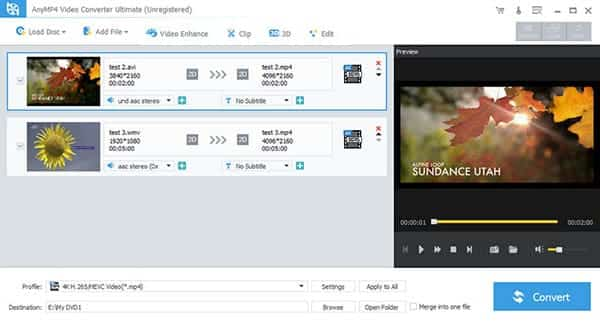
Screenshot
Reviews
Reference
OS Supported: Windows 11, Windows 10, Windows 8/8.1, Windows 7
Hardware Requirements: 800MHz Intel or AMD CPU, or above; 512MB RAM or more
| Support Input File Formats | |
| DVD | DVD Disk, DVD Folder, IFO Files | 4K Video | 4K H.265/HEVC Video, 4K H.264/MPEG-4 AVC, 4K TS, 4K AVI, WebM-VP8 4K WebM, WebM-VP9 4K WebM, 4K H.264 TS, XviD 4k, 4K H.264 FLV, 4K MKV FLV, Youtube 4K |
| General Video | TS, MTS, M2TS, MXF, TRP, TP, MP4, M4V, QT, MOV, MPG, MPEG, MPEG2, MPEG4, MJPG, MJPEG, AVI, 3GP, 3G2, FLV, MOD, TOD, RM, RMVB, WMV, ASF, MKV, SWF, F4V, VOB, DAT, DV, DIF, OGM, WTV, DVR-MS, Bink video, WebM |
| HD Video | MTS, TS, M2TS, TP, TRP, HD MPG, HD MPEG, HD MPEG2, HD MPEG4, HD MP4, HD WMV, QuickTime HD MOV |
| Audio | FLAC, WAV, WMA, MP3, MP2, AAC, AC3, AIFF, APE, CAF, MPC, QCP, OGG, M4A, M4B, AUD, MKA, AIFC, RA, RAM, AU, AIF, CUE |
| Support Output File Formats | |
| 4K Video | 4K H.265/HEVC Video, 4K H.264/MPEG-4 AVC, 4K TS, 4K AVI, WebM-VP8 4K WebM, WebM-VP9 4K WebM, 4K H.264 TS, XviD 4k, 4K H.264 FLV, 4K MKV FLV, Youtube 4K |
| General Video | MPG, MPEG-1, MPEG-2, MPEG-4, H.264, H.264/MPEG-4 AVC, DivX, XviD, AVI, FLV, MP4, M4V, MKV, MOV, 3GP, 3G2, MTV, SWF, WMV, ASF, DPG, TS, DV, VOB, AMV, WebM |
| HD video | TS, HD MP4, HD AVI, HD MOV, HD ASF, HD H.264/MPEG-4 AVC, HD MPEG-4, MPEG-2 HD, HD MKV, HD MPG, HD MPEG-4 TS, MPEG-2 TS HD, HD H.264 TS, DivX HD, XviD HD, YouTube HD, HD FLV, HD WMV, HD VOB, HD WebM |
| Audio | FLAC, WAV, WMA, AAC, ALAC, AC3, AIFF, AMR, AU, MP3, MP2, M4A, MKA, OGG |
| 3D Video | MP4 Side by Side 3D, MP4 Top and Bottom 3D, MP4 Anaglyph 3D, MKV Side by Side 3D, MKV Top and Bottom 3D, MKV Anaglyph 3D, TS Side by Side 3D, TS Top and Bottom 3D, TS Anaglyph 3D, AVI Side by Side 3D, AVI Top and Bottom 3D, AVI Anaglyph 3D, FLV Side by Side 3D, FLV Top and Bottom 3D, FLV Anaglyph 3D |
| Supported Portable Devices | |
| Apple Device: iPhone 17/Air/17 Pro/17 Pro Max, iPhone 16/16 Plus/16 Pro/16 Pro Max, iPhone 15/15 Plus/15 Pro/15 Pro Max, iPhone 14/14 Plus/14 Pro/14 Pro Max, iPhone 13/13 Pro/13 Pro Max/13 mini, iPhone 12 Pro Max/12 Pro/12/12 mini, iPhone 11 Pro Max/11 Pro/11, iPhone XS/XS Max/XR/X/8/8 Plus/7/7 Plus/6s/6s Plus/6/6 Plus/SE/5s/5c/5/4s/4, iPad, iPad Pro/mini 4/mini 3/mini 2/mini/Air 2/Air, iPod touch/nano, Apple TV 4K, Apple TV Game Console: PSP, PSP GO, PSP 3000, PS3, PlayStation Vita, NDS, Wii, Xbox360 Media Device: Archos, Creative Zen, Zen player, iRiver, Sansa, Sony Walkman, Zune Other Device: Samsung Galaxy Tab, Galaxy Note Edge, Galaxy S series, Microsoft Surface, Android Phone, Google Nexus, HP TouchPad, Kindle Fire, Windows Phone 8/7, Nokia, Nokia Lumia, Nokia Stereo, Nokia Mono, HTC One M8, HTC 816/820, LG, BlackBerry, Sony Xperia, Sony Tablet S, Motorola, Moto X, Dell, Dell Mini, Toshiba Thrive, Acer ICONIA, HP, Palm Pre, Acer, ASUS Eee Pad, General Pocket PC, Nook Table, etc. |
|
Our Users Are Also Downloading
 Video Converter Ultimate
Rip homemade DVD and convert videos to other formats.
Free Download Buy Now DVD Creator
Provides the best solution to convert any video format to DVD disc, DVD folder and ISO file.
Free Download Buy Now Blu-ray Player
Play Blu-ray movies including Blu-ray discs, Blu-ray folder and ISO file on PC.
Free Download Buy Now