User Review (1)  Go to Mac ->
$25.00 $12.50 50% OFF
As the top-ranking video converter for iPad 2, iPad 2 Video Converter enables you to convert almost all videos like MXF, MTS, MKV, AVI, FLV, MPG, VOB, WMV, F4V, etc to iPad 2 compatible MP4, MOV and M4V with ZERO quality loss. Also, you're free extract the audio files from the video and then convert them to MP3, M4A, AAC, WAV and other popular audio formats with ease. Thus, the output video and audio can play on iPad 2 and other mainstream digital players like iPad Air, iPad mini 2, iPad 4, the new iPad, iPad, iPhone 15/14/13/12/11, iPhone XS/XS Max, iPhone XR/X, iPhone 8/8 Plus, iPhone 7/7 Plus, iPhone 6/6 Plus, iPhone 5S/5C, iPhone 5, iPhone 4S, iPhone 4, iPod nano, iPod touch, iPod, etc.
Apart from the professional video to iPad conversion function, this almighty iPad 2 converter can work as the practical video editing software. Equipped with Effect, Trim, Crop, Watermark and Merge function, it ensures you to get the ideal output video for playback on iPad 2. In addition, you're free to customize the video and audio settings as well as select your desired audio track and subtitle if there are several available. It's also able to convert several videos to iPad 2. All in all, it's a trustworthy iPad 2 Video Converter that you cannot miss.

Sometimes iPad cannot play the movies that we import to it due to the compatibility issue. Don't let it ruin your movie mood. Here a professional yet easy-to-use iPad video converter is badly needed. iPad 2 Video Converter can convert any video to iPad videos like MP4, MOV and M4V with no limitation. Meaning while, you're able to optimize the video with versatile editing functions like Effect, Trim, Crop, Watermark and Merge. You can preview the source video as well as take a snapshot of your favorite video images.

Crop the video frame
With Crop function, you're free to adjust the video screen size according to your need. If you're not font of the black edges around the video frame, you can get rid of them. Check "Keep Aspect ratio" and then choose Original, Crop area, 16:9 and 4:3 to crop the video frame according to yourself.

Beautify the video effect
This first-class video converter for iPad 2 assists you to modify the video effect like brightness, contrast, saturation, hue and volume for your need. You just need to drag the slide bar of each parameter to change the corresponding value.

Trim and Merge videos
Trim function allows you to get rid of the undesired video part by setting the start time and end time, thus you're able to enjoy the part you like most after the conversion. Meaning while, Merge function enables you to put several video clips into a new file for successive enjoyment.

Add watermark to the video
Adding watermark to the video is a good way to make your video special. Your logo, picture, motto, etc can be added to your video as watermark to show your personalized taste. The font size, font color and the position of the watermark are adjustable at will.

Incomparable speed and original quality
Thanks to the advanced acceleration technology, you can get the iPad 2 videos in a short time. Also, the output videos keep the original quality. You'll have an eye feast on your iPad 2.

Preview and snapshot
With the built-in player, you're allowed to preview the source video as well as take a snapshot of your desired video image for the later use.
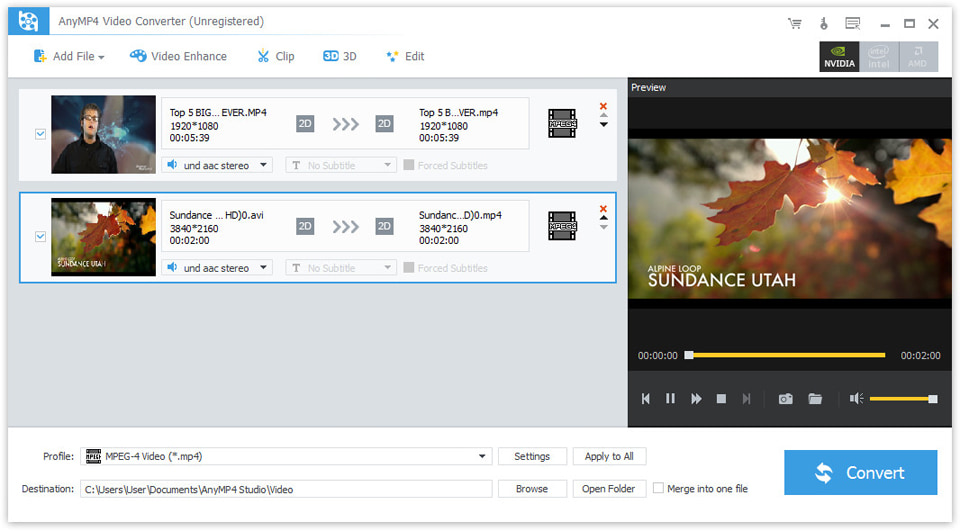
Screenshot
Reviews
Reference
OS Supported: Windows 11, Windows 10, Windows 8/8.1, Windows 7
Hardware Requirements: 800MHz Intel or AMD CPU, or above; 512MB RAM or more
| Support Input File Formats | |
| Audio | MP3, MP2, AAC, AC3, WAV, WMA, M4A, RM, RAM, OGG, AU, AIF, AIFF, APE, FLAC, CUE |
| 4K Video | 4K H.265/HEVC Video, 4K H.264/MPEG-4 AVC, 4K TS, 4K AVI, WebM-VP8 4K WebM, WebM-VP9 4K WebM, 4K H.264 TS, XviD 4k, 4K H.264 FLV, 4K MKV FLV, Youtube 4K | General Video | MPG, MPEG-1, MPEG-2, MPEG-4, MJPEG, VOB, DAT, MP4, DivX, Xvid, M4V, TS, MTS, M2TS, RM, RMVB, WMV, ASF, MKV, AVI, 3GP, 3G2, F4V, FLV, SWF, MPV, MOD, TOD, QT, MOV, DV, DIF, MJPG, MJPEG, TP, TRP, WebM |
| HD Video | MTS, TS, M2TS, MPG, MPEG, MP4, WMV, QuickTime HD MOV |
| Support Output File Formats | |
| 4K Video | 4K H.265/HEVC Video, 4K H.264/MPEG-4 AVC, 4K TS, 4K AVI, WebM-VP8 4K WebM, WebM-VP9 4K WebM, 4K H.264 TS, XviD 4k, 4K H.264 FLV, 4K MKV FLV, Youtube 4K |
| General Video | MPG, MPEG-1, MPEG-2, MPEG-4, H.264, H.264/MPEG-4 AVC, DivX, XviD, AVI, FLV, MP4, M4V, MKV, MOV, 3GP, 3G2, MTV, SWF, WMV, ASF, DPG, TS, DV, VOB, AMV, WebM |
| HD video | H.264/MPEG-4 AVC, AVI, ASF, MKV, MOV, MPG, TS, WMV, MP4, WebM |
| Audio | AAC, AC3, AIFF, AMR, AU, FLAC, M4A, MKA, MP2, MP3, OGG, WAV, WMA |
| 3D Video | MP4 Side by Side 3D, MP4 Top and Bottom 3D, MP4 Anaglyph 3D, MKV Side by Side 3D, MKV Top and Bottom 3D, MKV Anaglyph 3D, TS Side by Side 3D, TS Top and Bottom 3D, TS Anaglyph 3D, AVI Side by Side 3D, AVI Top and Bottom 3D, AVI Anaglyph 3D, FLV Side by Side 3D, FLV Top and Bottom 3D, FLV Anaglyph 3D |
| Supported Portable Devices | |
| Apple Device: iPhone 15/15 Plus/15 Pro/15 Pro Max, iPhone 14/14 Plus/14 Pro/14 Pro Max, iPhone 13/13 Pro/13 Pro Max/13 mini, iPhone 12 Pro Max/12 Pro/12/12 mini, iPhone 11 Pro Max/11 Pro/11, iPhone XS/XS Max/XR/X/8/8 Plus/7/7 Plus/6s/6s Plus/6/6 Plus/SE/5s/5c/5/4s/4, iPad, iPad Pro/mini 4/mini 3/mini 2/mini/Air 2/Air, iPod touch/nano, Apple TV 4K, Apple TV Game Console: PSP, PSP GO, PSP 3000, PS3, PlayStation Vita, NDS, Wii, Xbox360 Media Device: Archos, Creative Zen, Zen player, iRiver, Sansa, Sony Walkman, Zune Other Device: Samsung Galaxy Tab, Galaxy Note Edge, Galaxy S series, Microsoft Surface, Android Phone, Google Nexus, HP TouchPad, Kindle Fire, Windows Phone 8/7, Nokia, Nokia Lumia, Nokia Stereo, Nokia Mono, HTC One M8, HTC 816/820, LG, BlackBerry, Sony Xperia, Sony Tablet S, Motorola, Moto X, Dell, Dell Mini, Toshiba Thrive, Acer ICONIA, HP, Palm Pre, Acer, ASUS Eee Pad, General Pocket PC, Nook Table, etc. |
|
Our Users Are Also Downloading
 Video Converter Ultimate
Rip homemade DVD and convert videos to other formats.
Free Download Buy Now DVD Creator
Provides the best solution to convert any video format to DVD disc, DVD folder and ISO file.
Free Download Buy Now Blu-ray Player
Play Blu-ray movies including Blu-ray discs, Blu-ray folder and ISO file on PC.
Free Download Buy Now