User Review (2)  Go to Mac ->
$31.20 $15.60 50% OFF
iPad to Computer Transfer Ultimate ranks top among all the iPad to PC transfer software, which enables you to transfer music, movies, TV Shows, Podcasts, iTunes U, ringtone, e-books, photos, etc. from iPad to computer. Also, you can transfer and backup your contacts and SMS in case of losing or deleting them by an accident. In addition, it allows you to transfer music, movies, ringtones, e-books, TV shows, etc. to iTunes on your own wish.


Transfer files from iPad to PC
You can transfer music, movies, TV shows, Podcast, iTunes U, ringtone, e-book, camera roll, photos, SMS and contacts from iPad to computer for backup. Selectively mark those you need and click Transfer button to transfer them.

Transfer iPad files to iTunes
With the help of iPad to Computer Transfer, it's easy to transfer music, movies, TV shows, Podcasts, iTunes U, ringtone and e-books to iTunes with no limitation.

Back up SMS and contacts
You're able to backup the SMS and contacts in the program. Also you can delete the undesired backup files as you like.

Support all iOS devices
This professional iPad to Computer Transfer Ulatimate supports any version of iOS device like iPhone 17/16/15/14/13/12/11, iPhone XS/XS Max, iPhone XR/X, iPhone 8/8 Plus, iPhone 7/7 Plus, iPhone 6/6 Plus, iPhone 5s/5c/5/4S, iPad 4, iPad mini, iPod nano and other iOS devices.

Preview the iPad files
iPad to Computer Transfer Ultimate includes a built-in player, which allows you to watch the movies or listen to the songs with original quality.
Blazing-fast speed
No matter how many files you'd like to transfer to computer or iTunes, this almighty iPad to PC transfer app can complete the whole task in a few seconds.
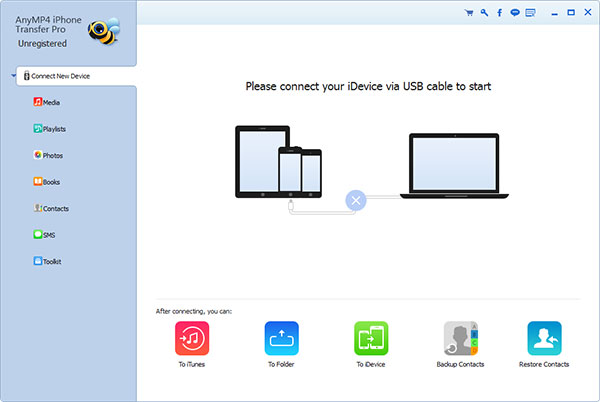
Screenshot
Reviews
Reference
OS Supported: Windows 11, Windows 10, Windows 8/8.1, Windows 7
Hardware Requirements: 800MHz Intel or AMD CPU, or above; 512MB RAM or more
| Support Devices | |
| iPhone 17/Air/17 Pro/17 Pro Max, iPhone 16/16 Plus/16 Pro/16 Pro Max, iPhone 15/15 Plus/15 Pro/15 Pro Max, iPhone 14/14 Plus/14 Pro/14 Pro Max, iPhone 13/13 Pro/13 Pro Max/13 mini, iPhone 12 Pro Max/12 Pro/12/12 mini, iPhone 11 Pro Max/11 Pro/11, iPhone XS/XS Max, iPhone XR/X, iPhone 8/8 Plus, iPhone 7/7 Plus, iPhone 6s, iPhone 6s Plus, iPhone 6, iPhone 6 Plus, iPhone 5S, iPhone 5C, iPhone 5, iPhone 4S, iPhone 4, iPhone 3GS, iPhone iPad Pro, iPad mini 2, iPad Air, iPad mini, iPad with Retina display, the new iPad, iPad 2, iPad 1, iPod touch 7/6/5/4/3/2/1 |
Tutorials & Articles
Our Users Are Also Downloading
 Android Data Recovery
Recover deleted contacts, text messages, call log from Android phones on PC.
Free Download Buy Now Video Converter Ultimate
Rip homemade DVD and convert videos to other formats.
Free Download Buy Now