User Review (1)  Go to Mac ->
$25.00 $12.50 50% OFF
PDF to Text Converter is your best assistant when converting PDF to Text files for a convenient view on WordPad. Even the image-based PDF files can be converted to the .txt format with ease. With the adoption of advanced OCR technology, it enables you to get a better output Text file. You're able to select the OCR modes like Accuracy, Balanced and Speed as well as choose the output language types to meet your needs.
It's an easy-to-use PDF to Text Converter in addition to its powerful conversion function. Thanks to the ultra initial interface, you're able to convert PDF files to Text format with a few clicks. In addition, you're allowed to convert specific pages or page range of a PDF file to .txt file. Also, it supports batch conversion, so you can convert multiple PDF files to .txt format at one time.

As the top-rank PDF to Text Converter, it offers you the easiest way to convert a PDF file to Text format with superior quality. You're guaranteed to get the clearer and more accurate Text files due to the OCR technology. In the preview window, you can preview the source PDF files at will. All in all, when it comes to converting PDF to Text, PDF to Text Converter is your best choice.

Advanced OCR technology
PDF to Text Converter adopts advanced OCR technology to convert PDF files to text format with the original layout and quality. You're able to select the OCR modes like Accuracy, Balanced and Speed according to your preferences.

Select specific pages to convert
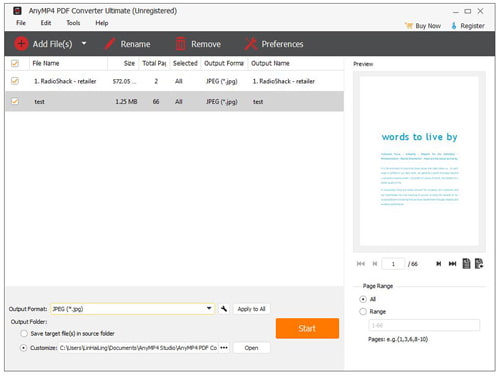
With this almighty PDF to Text converting tool, you're allowed to select specific pages or page range and convert them to Text format. When check the "Range" option, you could input the page numbers or page range at your disposal.

Incomparable conversion speed
PDF to Text Converter is capable of converting PDF to Text files in a few seconds. You can view the output Text files with WordPad anytime you want. The fast speed is beyond your imagination.

Support batch conversion
This amazing PDF to Text Converter supports batch conversion, so it's easy to get several Text files at one time, which saves your valuable time to a great extent.

Preview the source PDF file
With the built-in player, it's easy to preview the source PDF files in the preview window if necessary.

Convenient operations
It owns user-friendly design so anyone can operate it very easily. With a few clicks, you can get clear and accurate Text files.
Screenshot
Reviews
Reference
OS Supported: Windows 11, Windows 10, Windows 8/8.1, Windows 7
Hardware Requirements: 800MHz Intel or AMD CPU, or above; 512MB RAM or more
| Support Input File Formats | |
| Support Output File Formats | |
| Document | Text(*.txt), Microsoft Word (*.doc), Rich Text Format (*.rtf), Microsoft Excel (*.xls), EPUB, HTML |
| Image | TIFF, JPEG, PNG, GIF, BMP, TGA, PPM, JPEG2000 |
Our Users Are Also Downloading
 Video Converter Ultimate
Rip homemade DVD and convert videos to other formats.
Free Download Buy Now DVD Creator
Provides the best solution to convert any video format to DVD disc, DVD folder and ISO file.
Free Download Buy Now Blu-ray Player
Play Blu-ray movies including Blu-ray discs, Blu-ray folder and ISO file on PC.
Free Download Buy Now