User Review (1)  Go to Mac ->
$25.00 $12.50 50% OFF
PS3 Video Converter is the best PS3 Converter for Windows, which can convert any video to PS3 video, PS3 1080p/720p HD video perfectly. With this program, you are easy to convert video to PS3 MP4, WMV, AVI, MPG, TS with zero loss quality.
Except for the video to PS3 converting ability, the PS3 Video Converter enables you to process the source video before converting so as to output the ideal video as you have expected.


With this amazing video to PS3 converter, it is easy for you to convert any popular video like MP4, WMV, MOV, VOB, FLV, MTS, M2TS, MKV, MXF, MOD, etc. to PS3 video MP4, WMV, AVI, MPG and TS with zero loss quality.
Also it can help you convert video to HD video like H.264 HD, WMV HD, MPEG2-PS HD, MPEG2-TS HD, DivX HD, XviD HD, HD AVI, HD WebM, YouTube HD, H.264 HD TS, H.264 HD FLV, etc.
You can also use this versatile PS3 Video Converter to convert video to PSP, Walkman and Sony XPERIA and more.
The PS3 Video Converter allows you to convert several video files to output different PS3 video formats with just one conversion.

Edit to Personalize the Video
In order to make the output PS3 video personalized, PS3 Video Converter provides you various editing tools so as to help you crop the video size, trim video length, adjust video visual effect, add watermark and merge several videos together. With this converter, you can fully enrich the digital life of your PS3.

Set the Output Parameters
There are various video and audio parameters are listed for your to preset, such as Video Encoder, Frame Rate, Resolution, Aspect Ratio, Video Bitrate, Audio Encoder, Sample Rate, Channels and Audio Bitrate. All these settings will be saved as the default values for your later use.

Take Snapshot
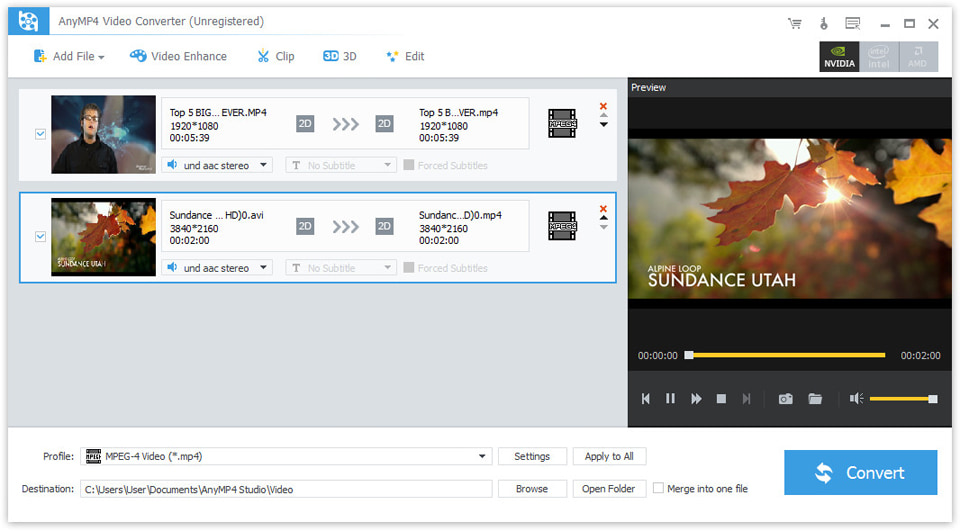
With the built-in player, PS3 Video Converter enables you to preview the source and output videos so as to see clearly the comparison between them and to better optimize the PS3 video. Meanwhile, you can take snapshot of the favorite scenes and save them as JPG, GIF or BMP in a default folder.

Easy-to-use and Ultra-fast
The PS3 video converting program is easy to operate for its intuitive and graphic interface along with the simple operating process. The rapid video to PS3 converting speed and high video/audio/image quality can bring you the special experience unprecedented.
Screenshot
Reviews
Reference
OS Supported: Windows 11, Windows 10, Windows 8/8.1, Windows 7
Hardware Requirements: 800MHz Intel or AMD CPU, or above; 512MB RAM or more
| Support Input File Formats | |
| Audio | MP3, MP2, AAC, AC3, WAV, WMA, M4A, RM, RAM, OGG, AU, AIF, AIFF, APE, FLAC, CUE |
| 4K Video | 4K H.265/HEVC Video, 4K H.264/MPEG-4 AVC, 4K TS, 4K AVI, WebM-VP8 4K WebM, WebM-VP9 4K WebM, 4K H.264 TS, XviD 4k, 4K H.264 FLV, 4K MKV FLV, Youtube 4K | General Video | MPG, MPEG-1, MPEG-2, MPEG-4, MJPEG, VOB, DAT, MP4, DivX, Xvid, M4V, TS, MTS, M2TS, RM, RMVB, WMV, ASF, MKV, AVI, 3GP, 3G2, F4V, FLV, SWF, MPV, MOD, TOD, QT, MOV, DV, DIF, MJPG, MJPEG, TP, TRP, WebM |
| HD Video | MTS, TS, M2TS, MPG, MPEG, MP4, WMV, QuickTime HD MOV |
| Support Output File Formats | |
| 4K Video | 4K H.265/HEVC Video, 4K H.264/MPEG-4 AVC, 4K TS, 4K AVI, WebM-VP8 4K WebM, WebM-VP9 4K WebM, 4K H.264 TS, XviD 4k, 4K H.264 FLV, 4K MKV FLV, Youtube 4K |
| General Video | MPG, MPEG-1, MPEG-2, MPEG-4, H.264, H.264/MPEG-4 AVC, DivX, XviD, AVI, FLV, MP4, M4V, MKV, MOV, 3GP, 3G2, MTV, SWF, WMV, ASF, DPG, TS, DV, VOB, AMV, WebM |
| HD video | H.264/MPEG-4 AVC, AVI, ASF, MKV, MOV, MPG, TS, WMV, MP4, WebM |
| Audio | AAC, AC3, AIFF, AMR, AU, FLAC, M4A, MKA, MP2, MP3, OGG, WAV, WMA |
| 3D Video | MP4 Side by Side 3D, MP4 Top and Bottom 3D, MP4 Anaglyph 3D, MKV Side by Side 3D, MKV Top and Bottom 3D, MKV Anaglyph 3D, TS Side by Side 3D, TS Top and Bottom 3D, TS Anaglyph 3D, AVI Side by Side 3D, AVI Top and Bottom 3D, AVI Anaglyph 3D, FLV Side by Side 3D, FLV Top and Bottom 3D, FLV Anaglyph 3D |
| Supported Portable Devices | |
| Apple Device: iPhone 17/Air/17 Pro/17 Pro Max, iPhone 16/16 Plus/16 Pro/16 Pro Max, iPhone 15/15 Plus/15 Pro/15 Pro Max, iPhone 14/14 Plus/14 Pro/14 Pro Max, iPhone 13/13 Pro/13 Pro Max/13 mini, iPhone 12 Pro Max/12 Pro/12/12 mini, iPhone 11 Pro Max/11 Pro/11, iPhone XS/XS Max/XR/X/8/8 Plus/7/7 Plus/6s/6s Plus/6/6 Plus/SE/5s/5c/5/4s/4, iPad, iPad Pro/mini 4/mini 3/mini 2/mini/Air 2/Air, iPod touch/nano, Apple TV 4K, Apple TV Game Console: PSP, PSP GO, PSP 3000, PS3, PlayStation Vita, NDS, Wii, Xbox360 Media Device: Archos, Creative Zen, Zen player, iRiver, Sansa, Sony Walkman, Zune Other Device: Samsung Galaxy Tab, Galaxy Note Edge, Galaxy S series, Microsoft Surface, Android Phone, Google Nexus, HP TouchPad, Kindle Fire, Windows Phone 8/7, Nokia, Nokia Lumia, Nokia Stereo, Nokia Mono, HTC One M8, HTC 816/820, LG, BlackBerry, Sony Xperia, Sony Tablet S, Motorola, Moto X, Dell, Dell Mini, Toshiba Thrive, Acer ICONIA, HP, Palm Pre, Acer, ASUS Eee Pad, General Pocket PC, Nook Table, etc. |
|
Our Users Are Also Downloading
 Video Converter Ultimate
Rip homemade DVD and convert videos to other formats.
Free Download Buy Now DVD Creator
Provides the best solution to convert any video format to DVD disc, DVD folder and ISO file.
Free Download Buy Now Blu-ray Player
Play Blu-ray movies including Blu-ray discs, Blu-ray folder and ISO file on PC.
Free Download Buy Now