User Review (3)  Go to Mac ->
$31.20 $15.60 50% OFF
DVD to DPG Converter is such a professional DVD Converter to DPG that assists you to convert/rip homemade DVD to any popular video and audio formats. It also supports various portable digital players.
DVD to DPG Converter is such a professional DVD Converter to DPG that assists you to convert/rip homemade DVD to any popular video and audio formats. It also supports various portable digital players.

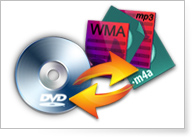
DVD to DPG Converter helps you to convert homemade DVD to DPG and other video formats, like MP4, MOV, M4V, AVI, even HD videos, MPG and TS.
With DVD to DPG Converter, you can convert homemade DVD to audio AAC, AC3, AIFF, AMR, AU, MP3, OGG, WAV, WMA, and etc.
DVD to DPG Converter can be used not only to NDS, but also to other portable devices, like iPod, iPhone, iPhone 4, iPad, iPad 2, Apple TV, PSP, Wii, Sony, and BlackBerry…

Adjust video encoder, video frame rate, video bitrate, video resolution, audio encoder, audio sample rate, audio channels, and audio bitrate. All settings can be saved as user-defined profile.
Trim the video length by setting the start and end time precisely or just by dragging the slide bar visually.
Adjust output video aspect ratio as original, full screen, 16:9, and 3:4 to crop the video region or remove the black edges
Combine several video chapters into one file for your later enjoyment.
Add text or picture watermark for your video. You also can capture pictures while previewing video movies.

In the edit window, you can preview both source video and converted video at the same time for you to see clearly the contrast effect.
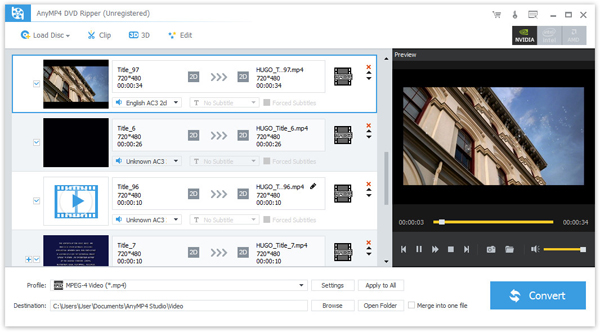
Its clear and intuitive interface gives correct and necessary instructions for you to rip homemade DVD to NDS DPG in a few clicks.
With NVIDIA® CUDA™ technology, DVD to DPG Converter makes your conversion speed 6X faster than before.
Screenshot
Reviews
Reference
OS Supported: Windows 11, Windows 10, Windows 8/8.1, Windows 7
Hardware Requirements: 800MHz Intel or AMD CPU, or above; 512MB RAM or more
| Support Input File Formats | |
| DVD | DVD Disc, DVD Folder, DVD IFO Files |
| Support Output File Formats | |
| Audio | FLAC, WAV, WMA, AAC, ALAC, AC3, AIFF, AMR, AU, MP3, MP2, M4A, MKA, OGG |
| General Video | MPG, MPEG-1, MPEG-2, MPEG-4, H.264, H.264/MPEG-4 AVC, DivX, XviD, AVI, FLV, MP4, M4V, MKV, MOV, 3GP, 3G2, MTV, SWF, WMV, WMV-2, ASF, DPG, TS, DV, VOB, AMV, ProRes Proxy, ProRes LT, ProRes Standard, ProRes HQ, WebM |
| HD Video | TS, HD MP4, HD AVI, HD MOV, HD ASF, HD H.264/MPEG-4 AVC, HD MPEG-4, MPEG-2 HD, HD MKV, HD MPG, HD MPEG-4 TS, MPEG-2 TS HD, HD H.264 TS, DivX HD, XviD HD, YouTube HD, HD FLV, HD WMV, HD VOB, HD WebM |
Tutorials & Articles
Our Users Are Also Downloading
 Blu-ray Player
Play Blu-ray movies including Blu-ray discs, Blu-ray folder and ISO file on PC.
Free Download Buy Now DVD Creator
Provides the best solution to convert any video format to DVD disc, DVD folder and ISO file.
Free Download Buy Now