
To convert videos to MP4 format has become more and more popular among player users with more and more players supporting MP4. It is also the case for RM file to MP4. There comes RM to MP4 format to help users to convert RM to MP4 with fast converting speed and high output quality. Apart from converting videos, this RM to MP4 Converter also endows with abundant editting functions with trim, crop, effect, watermark and so on. Thereinafter provides one step-way guide for users to convert RM to MP4 smoothly.
Software: 3D Converter
OS Supported: Windows 8, Windows 7, Windows XP (SP2 or later), Windows Vista
Hardware Requirements: 800MHz Intel or AMD CPU, or above; 512MB RAM or more
Step 1 Import files
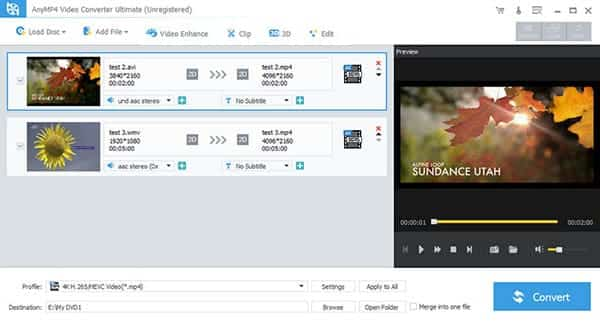
Click "Add Video" shortcut button to add RM files to the converter.
Step 2 Profile and destination
Choose output format - MP4 from "Profile" and choose destination for the output video from "Browse".
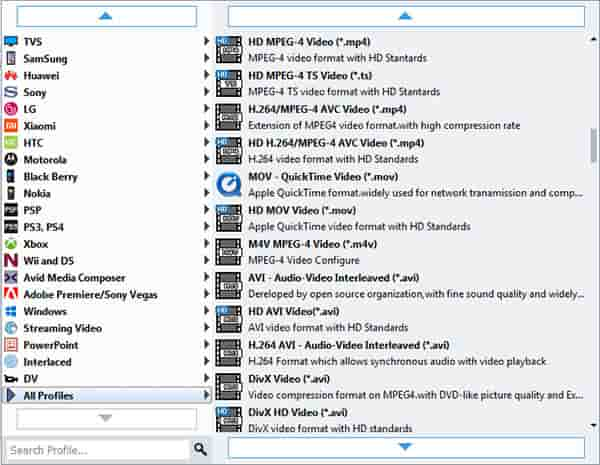
Rename Video: Should the video name is not suitable for it or incorrect, click "Rename" to change one name for it.
Step 3 Start conversion
Click "Convert" button to start to convert RM to MP4.
Only these three steps, you can convert these videos from RM to MP4 easily. Advanced in converting video to MP4 format, this MP4 converter can convert other files to MP4 with ease, such as convert AVI to MP4, MKV to MP4, 3GP to MP4. Enjoy your videos!!

 Free Download
 Free Download


