User Review (3)  Go to Win ->
$24.90 $12.45 50% OFF
DVD Creator for Mac gives the best solution to create and burn customized DVD with various video files. You can use this amazing Mac DVD creating/burning software to burn DVD disc, DVD folder or ISO image file from video MP4, WMV, AVI, 3GP, VOB, MOV, MTS, MKV, DivX, XviD, MPEG, etc.
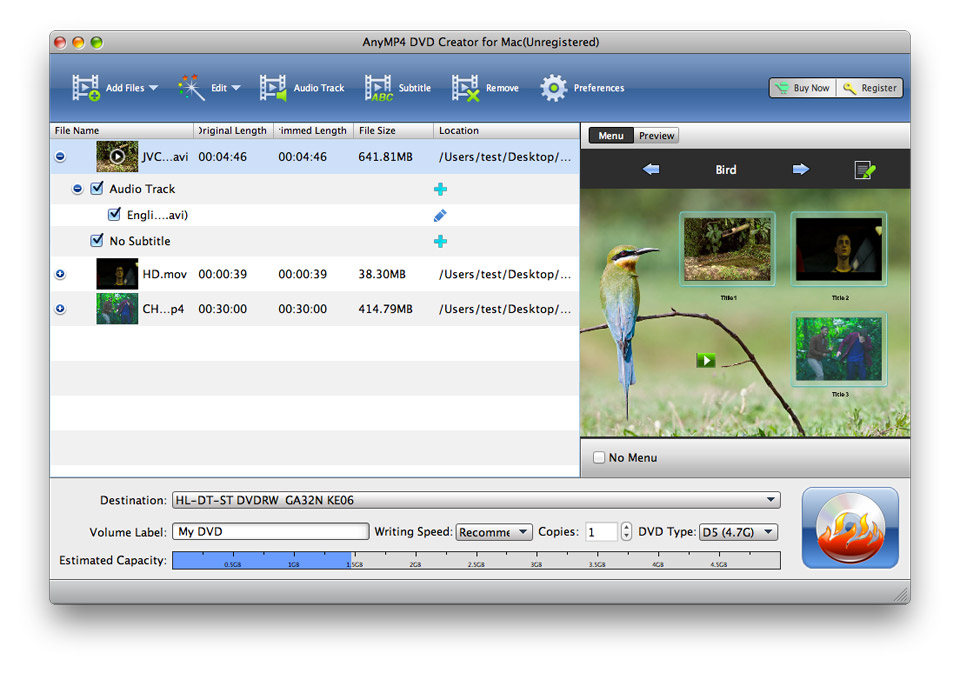
There are plenty of DVD menu templates, background music, background pictures, frame styles, button types and title contents are provided by this easy DVD Creator for Mac so as you can totally personalize your created DVD for your preference. Also there are various audio tracks and subtitles are available for you to choose.

With this Mac DVD Creator, you can get DVD disc, DVD folder or ISO image file by converting the video movies you select.
All the popular video files like MP4, AVI, 3GP, WMV, MOV, VOB, DivX, XviD, MPEG, FLV, TOD, MOD, MTS, MKV, etc. are acceptable as the input files for you to create customized DVD on Mac.
The DVD Creator for Mac supports all popular DVD formats including DVD-R, DVD+R, DVD-RW, DVD+RW, DVD+R DL, DVD-R DL, DVD-5 and DVD-9.

It is easy for you to change the video visual effect by adjusting the brightness, contrast, saturation and hue.
You can use this DVD Creator for Mac to trim the video clips from the source video file, and then you can join the ones you like together. Join several video files together to get a long DVD movie.
For making the created DVD suitable to play on your DVD player, you can adjust video aspect ratio and zoom mode before burning to DVD.
Adding special text or image watermark can bring you the personalized DVD effect.
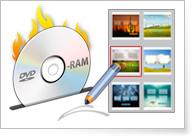
Various DVD menu templates, frame styles and button types are provided for you to choose. And you can add text to this DVD and define its font, color and size.
Also this DVD Creator for Mac allows you to add your own background music and background pictures to the DVD.

Using this DVD Creator for Mac, you can add more than more audio tracks for the created DVD. The language, volume, latency, encoder, bitrate, channels all can be defined for your need.
This Blu-ray Ripper has the clear-cut interface, which makes your operation easy and convenient.
The DVD Creator for Mac can help you add local disc subtitles to the DVD. It is easy for you to specify the number, language, position, font size, font name and delay of the subtitles.

With DVD Creator for Mac, you can preview the added video files before burning to DVD. Meanwhile, you can take snapshot of the scene you like.
This amazing Mac DVD creating software is easy to use with intuitive and graphic interface. Advanced technology can create DVD with high speed and high quality.
Screenshot
Reference
Processor: Intel® processor and M1&M2 chip
OS Supported: Mac OS 10.12 (Sierra) or later (including macOS Sonoma)
Hardware Requirements: 512MB RAM, Super VGA (800×600) resolution, 16-bit graphics card or higher
| Support Input File Formats | |
| DVD | DVD Disc, DVD Folder, DVD IFO Files |
| Support Output File Formats | |
| HD Video | TS, HD MP4, HD AVI, HD MOV, HD ASF, HD H.264/MPEG-4 AVC, HD MPEG-4, MPEG-2 HD, HD MKV, HD MPG, HD MPEG-4 TS, MPEG-2 TS HD, HD H.264 TS, DivX HD, XviD HD, YouTube HD, HD FLV, HD WMV, HD VOB, HD WebM |
| General Video | MPG, MPEG-1, MPEG-2, MPEG-4, H.264, H.264/MPEG-4 AVC, DivX, XviD, AVI, FLV, MP4, M4V, MKV, MOV, 3GP, 3G2, MTV, SWF, WMV, WMV-2, ASF, DPG, TS, DV, VOB, AMV, WebM |
| Audio | FLAC, WAV, WMA, AAC, AC3, AIFF, AMR, AU, MP3, MP2, M4A, MKA, OGG |
| Support Devices | |
| iPad (iPad Pro, iPad mini 4, iPad Air 2), iPhone (iPhone 15/15 Plus/15 Pro/15 Pro Max, iPhone 14/14 Plus/14 Pro/14 Pro Max, iPhone 13/13 Pro/13 Pro Max/13 mini, iPhone 12 Pro Max/12 Pro/12/12 mini, iPhone 11 Pro Max, iPhone 11 Pro, iPhone 11, iPhone XS, iPhone XS Max, iPhone XR, iPhone X, iPhone 8/8 Plus, iPhone 7/7 Plus, iPhone 6/6 Plus, iPhone 5s/5c/5/4S), iPod (iPod touch, iPod nano, iPod classic), Apple TV Android devices: Samsung, HTC, Motorola, LG, Acer, Dell Mobile phones: BlackBerry, Nokia, Motorola, LG, Sony Ericsson, Sony Xperia, Sony Walkman NDS, PSP, PS3, Wii, Xbox 360 Archos, Creative ZEN, iRiver, Sony Walkman, ZEN Player, Zune, Sansa General Pocket PC, HP iPAQ, Palm Pre, etc. |
|
Our Users Are Also Downloading
 Blu-ray Player for Mac
Play Blu-ray movies including Blu-ray discs, Blu-ray folder and ISO file on Mac.
Free Download Buy Now Video Converter Ultimate for Mac
Rip homemade DVD and convert videos to other formats on Mac.
Free Download Buy Now