
The ASF to FLV Converter is developed specially to convert ASF to FLV perfectly and quickly so that they can freely upload their favorite ASF files to internet with FLV format. For web publishers and youtube upload fans, this ASF to FLV converter is a perfect solution on converting any video to FLV videos. Also, it can convert all popular video files from one format to another format and convert video to audio for users.
What you need?
Software: Video Converter Platinum
OS Supported: Windows 8, Windows 7, Windows XP (SP2 or later), Windows Vista
Hardware Requirements: 800MHz Intel or AMD CPU, or above; 512MB RAM or more
Step 1 Select and add source file
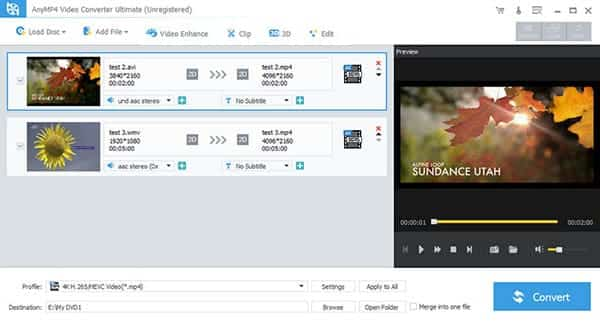
Launch the ASF to FLV Converter, and Click "add file" button to input ASF video files to be converted.
Step 2 Target format and folder
Select FLV – Flash Video Format (*.flv) as your target format and use the "Browse" button to select an output directory.
Step 3 Start ASF to FLV conversion
For better enjoyment, you can edit the DVD before converting by clicking "Effect", "Trim" and "Crop". Then you can adjust the video brightness, contrast, saturation, volume, hue, time-length, play screen, etc. and add watermark.
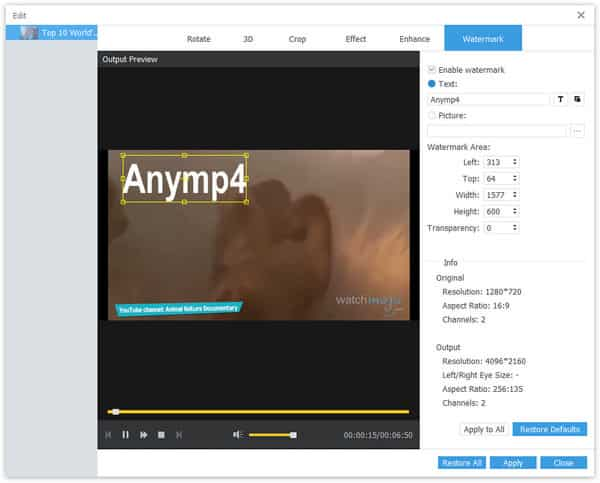
What's more, you can use the special function – Watermark to make your output videos personalized.
Text watermark: Click T to edit the font of text you added including font style, font size, font color, font effect and more features.
Image watermark: Specify the image you want to use as watermark and adjust the position and transparence as you like.

 Free Download
 Free Download


