
TS stands for Transport stream. It is a format specified in MPEG-2 Part 1. Its design goal is to allow multiplexing of digital video and audio and to synchronize the output.TS Converter converts TS to other popular video formats like WMV, MPEG, FLV, MP4, DivX, XviD etc. Especially, it makes your conversion task TS to MP4 a breeze because TS to MP4 converter is a simple and easy-to-use TS MP4 converter which can convert TS files to MP4 and the TS to MP4 conversion routine is as easy as ABC. The output quality is great without any loss of quality.
Software: 3D Converter
OS Supported: Windows 8, Windows 7, Windows XP (SP2 or later), Windows Vista
Hardware Requirements: 800MHz Intel or AMD CPU, or above; 512MB RAM or more
Step 1 Load TS video
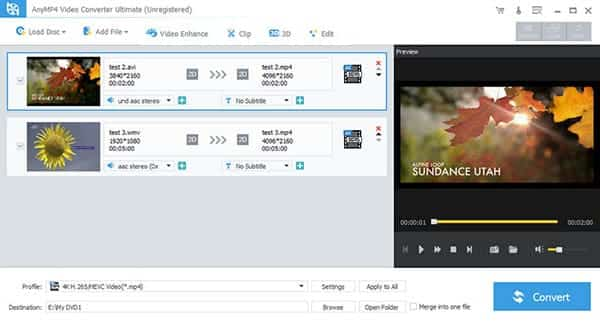
Select TS files as your source files from dialog box that opens after clicking "Add Video" button, and add them to the file list.
Instant preview the videos you have loaded before conversion is available like this:
Step 2 Select output file type and output location
After you added TS files, you can select an output format for each video file (MP4 here) and specify a directory on your computer to save the output files.
TS converter supports comprehensive output video formats including AVI, MPEG, WMV, MP4, XviD, 3GP, FLV, etc.
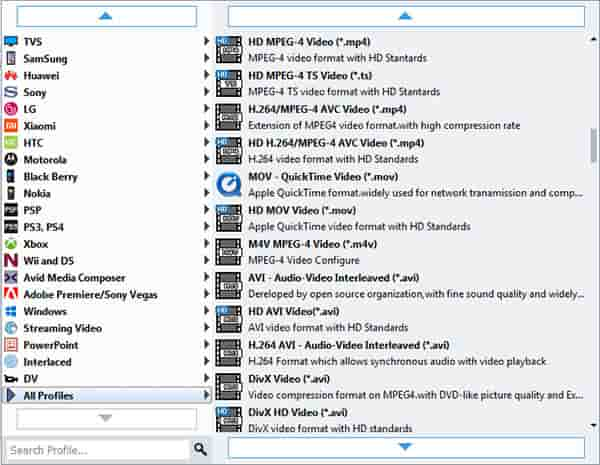
Apply to all: Check "Apply to all" to apply the current profile to all the files.
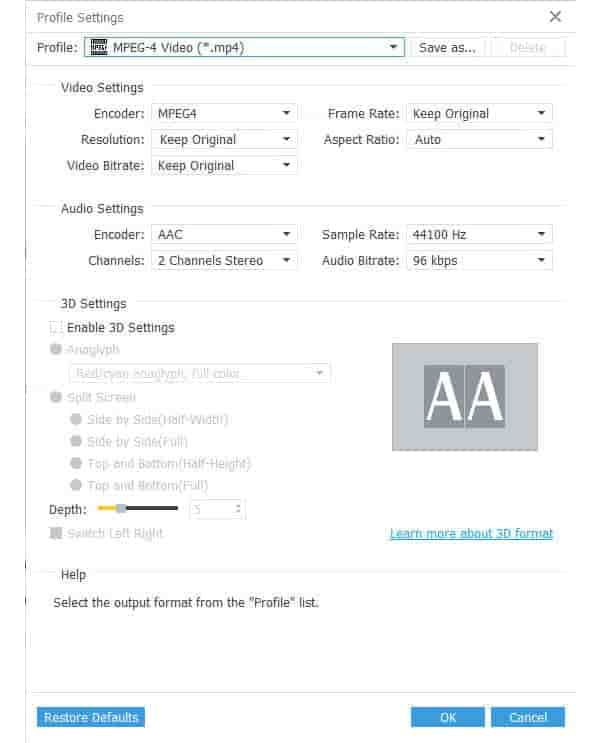
Click Settings to open the Settings window.
Step 3 TS to MP4 converting
Click "Convert" button, TS to MP4 Converter will start converting TS videos automatically. After clicking, you can see the converting progress window for references.
As you see, just a few clicks, the converting is finished. Once the conversion is ok, you can get the converted MP4 files and enjoy them with popular players. Try TS to MP4 Converter and have a wonderful experience right now!

 Free Download
 Free Download


