
The release of iPad 2 brought more surprise to iPad fans. iPad 2 is thinner and lighter than iPad, which makes Apple fans fall in love with this fantastic device. With iPad 2, you can get much happiness and interest from digital life. But once you own such a magic device, how could you control your iPad 2 easily?
If you want to enjoy favorite videos, recall the best memory with photos and listen to music anytime and anywhere, a good assistant is necessary. iPad 2 Video Converter will be your best choice.
Software: iPad 2 Video Converter
OS Supported: Windows 8, Windows 7, Windows XP (SP2 or later), Windows Vista
Hardware Requirements: 800MHz Intel or AMD CPU, or above; 512MB RAM or more
Step 1 Add files
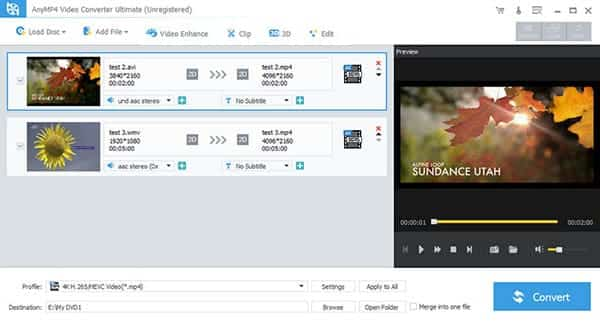
Click "Add File" to load videos. The program supports drag and drop behaviors which facilitate a fast import of multiple files.
After importing, the files can be merged, re-arranged in order, renamed for output or previewed in advance.
Step 2 Output Settings
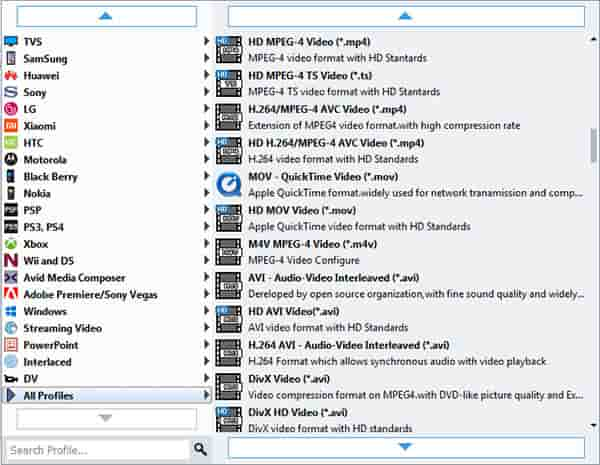
Choose output format from Profile. Choose "iPad 2 MPEG-4 Video (.mp4)" as the output format.
Click the "Browse" button at the bottom of the panel. Browse the directory in the pop-up window and select or create a file folder to store the output videos.
Step 3 Start conversion
After the basic steps above, click "Start" button on the toolbar to start conversion. You can pause, or cancel the conversion at any time.
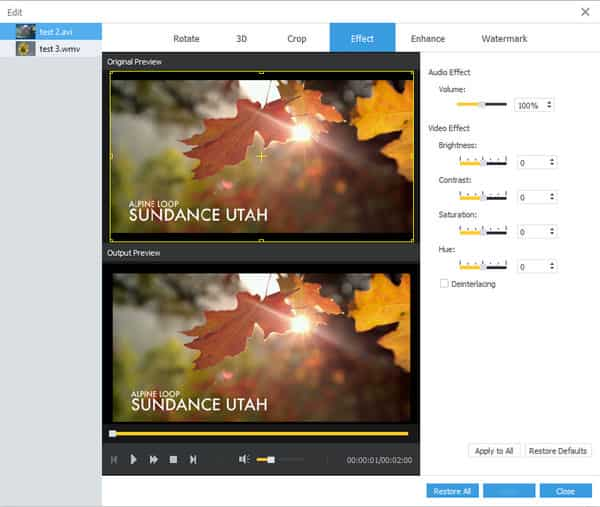
There are some useful editing features:
You can edit the input video by trimming, cropping, effect, watermark and more editing features, so as to get the best output effect.

 Free Download
 Free Download


