
AVI to MOV Converter is advanced Total Video Converter which can convert any video formats among MP4, M4V, AVI, WMV, MOV, etc., highly support HD and 4K UHD videos. The upgrade enhancement enables you to enhance video quality and rotate videos freely. You can also personalize your video by adding watermark in the form of text or image.
AVI is a subformat of the Resource Interchange File Format (RIFF), which divides a file's data into blocks, or "chunks." Each "chunk" is identified by a FourCC tag. An AVI file takes the form of a single "chunk" in a RIFF formatted file, which is then subdivided into two mandatory "chunks" and one optional "chunk". AVI files can contain both audio and video data in a file container that allows synchronous audio-with-video playback. Like the DVD video format, AVI files support multiple streaming audio and video, although these features are seldom used.
- - Wikimedia
MOV is a filename extension for the QuickTime multimedia file format, QuickTime File Format (QTFF) is a computer file format used natively by the QuickTime framework. The format specifies a multimedia container file that contains one or more tracks, each of which stores a particular type of data: audio, video, or text (e.g. for subtitles). Each track either contains a digitally-encoded media stream (using a specific format) or a data reference to the media stream located in another file.
- - Wikimedia
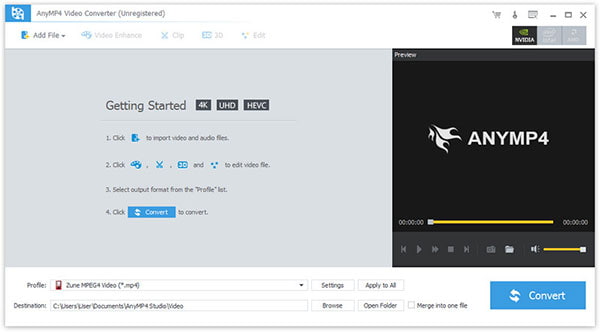
Step 1. Download and install the program, then double click it to run it, and then you'll see the main interface of the program.
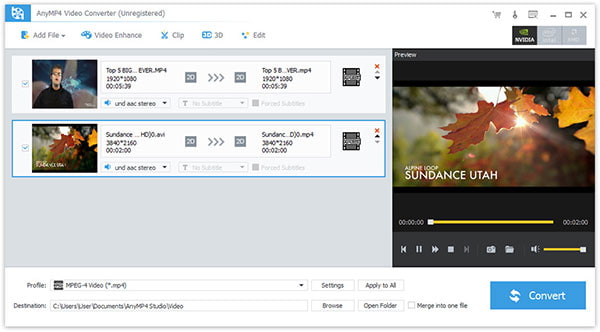
Step 2. Click "Add File(s)" button. Here you can select "Add Video" or "Add Folder" button to add files as you like.
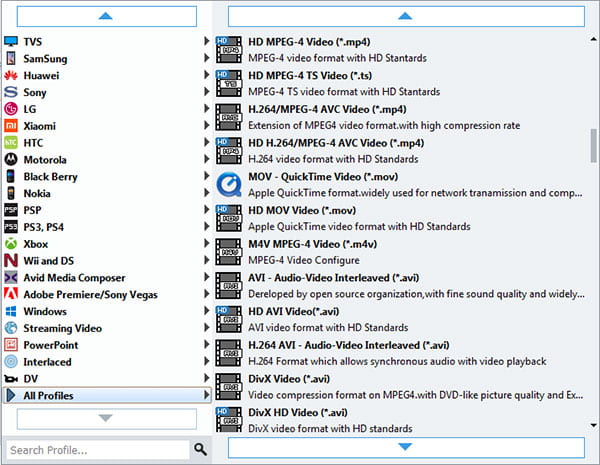
Step 3. Click the drop-down arrow right beside the "Profile" column and select your desired video format from the drop-down list.
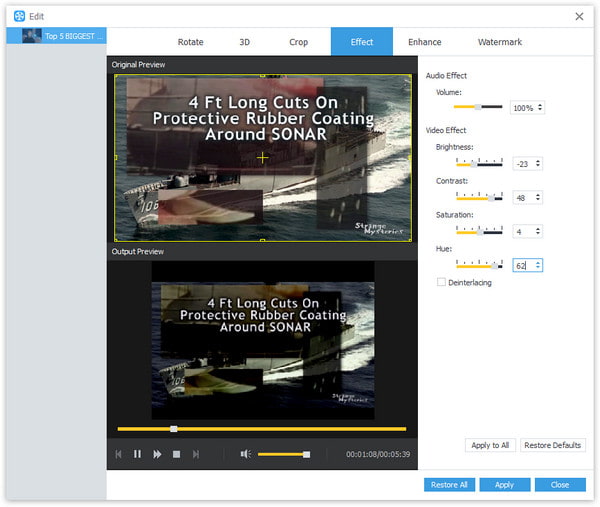
Step 4. Click "Edit" button to customize the output video like Effect, Trim, Crop, 3D Settings and Watermark.

 Free Download
 Free Download


