
It's kind of difficulty to play lots of videos in BD at the same time. Maybe iPod is a good choice, so many people want to convert Blu-ray to iPod files. If you also are looking for a Blue-ray converter to iPod tool, this Blu-ray to iPod Converter can help you a lot for it is designed to rip and convert Blu-ray to iPod files, so that you can watch Blu-ray movies on iPod. This versatile Blu-ray to iPod Ripper allows you to preview the movie before converting, clip any segment of the movie, snapshot the images in preview, etc.
Additionally, iPad 2, iPhone 4S, iOS 5 are supported by this Blu-ray Converter.
Blu-ray to iPod Converter provides the channel to convert Blu-ray files to Apple iPod files. Do have a try!
Step 1 Initialize the program and load Blu-ray file
After running this Blu-ray to iPod converter, click Add folder button, select a Blu-ray files in the dialog box that opens, and load it. The Loaded Blu-ray video information will be showed in the file list, such as Name and Status etc will be showed in the file list.
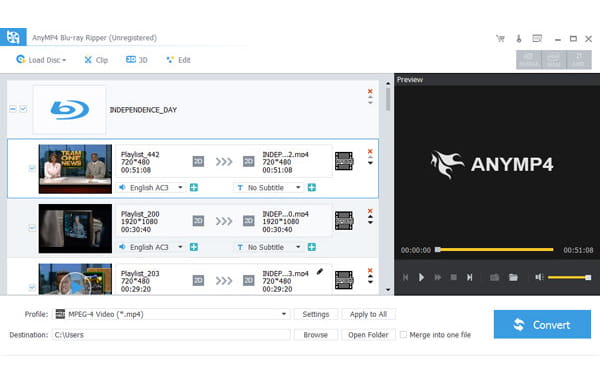
Step 2 Select and customize the output format
Click "Profile" drop-down button, then a new Window props up as below. You select the formats you need. For we need convert Blu-ray to iPod, we select the iPod video format as the output format. Then click "Browse" button to select a destination folder in the window that opens, click OK.
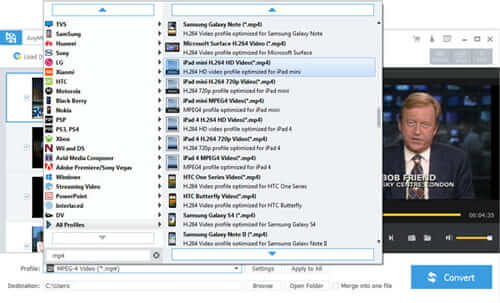
Step 3 Convert Blu-ray to iPod
After finishing the above settings, check the needed file to convert in the file list, click Convert button on the main interface, to start converting Blu-ray to iPod. You can view the progress of converting Blu-ray to iPod from the progress bar at the bottom of the window.

 Free Download
 Free Download


