User Review (1)  Go to Win ->
$25.00 $12.50 50% OFF
M2TS Converter for Mac is a practical app, which can convert M2TS and TS files to other popular video formats like MP4, MOV, M4V, AVI, FLV, WMV, 3GP, MKV, etc. with blazing-fast speed and ZERO quality loss. In addition, you're free to take out the audio files from the source M2TS file and then convert them to virtually any audio format for your need. Equipped with multiple creative and flexible video editing functions like Effect, Trim, Crop, Merge and Watermark, it will ensure you to get a ideal output video and audio files.
With the built-in player, you're able to watch the video with great image quality in the preview window. Before the conversion, you still can customize the video and audio settings at your disposal. The output video and audio files can play on diverse portable players, including iPhone 17/Air/17 Pro/17 Pro Max, iPhone 16/16 Plus/16 Pro/16 Pro Max, iPhone 15/15 Plus/15 Pro/15 Pro Max, iPhone 14/14 Plus/14 Pro/14 Pro Max, iPhone 13/13 Pro/13 Pro Max/13 mini, 12 Pro Max/12 Pro/12/12 mini, iPhone 11 Pro Max/11, iPhone 11 Pro Max/11 Pro/11, iPhone 6/6 Plus, iPhone 5s/5c, iPhone 5, iPhone 4S, iPhone 4, iPad Air, iPad mini 2, iPad 4, iPod nano, iPod touch, Samsung Galaxy Note 3, Samsung Galaxy S4, Nokia Lumia and more.

As the top-ranking Mac M2TS converter, M2TS Converter for Mac can not only convert M2TS and TS files to other popular video and audio formats on Mac, but also offer you multiple video editing functions to optimize the video as you like. With this almighty M2TS video converter for Mac, you can handle any M2TS to MP4/MOV/AVI/FLV/WMV, etc. conversion. The ultra initial interface makes sure that even the rookie users can operate it easily.

Get better video effect
Effect function allows you to drag the slide bar of brightness, contrast, saturation, hue and volume to change the video effect. With Effect feature, it's no doubt that you can get the perfect output video.

Merge videos for your need
Merge function enables you to join several video files together for a successive enjoyment. Joining several family videos together is so easy with the help of Merge function.

Crop the video frame at will
If the black edges of the source video make you uncomfortable, Crop function can get rid of them for you. You can choose Original, Crop area, 16:9 and 4:3 to adjust the video frame.

Define the video/audio settings
You can customize the video and audio settings before the conversion, such as video/audio encoder, video/audio bitrate, frame rate, sample rate, resolution, aspect ratio and more.

Add watermark to the video
Adding watermark to the video is a good way to identify the videos as your own. You can add photos, signature, motto, etc. to the video as watermark. The position and transparency of the watermark are adjustable on your own wish.

Trim the video length
If you only want to convert a part of the video, Trim function can help you out. You're able to drag the slide block at both ends to set the start time and end time. After the conversion, you can enjoy the part you like most on your portable device.

Preview and take snapshot
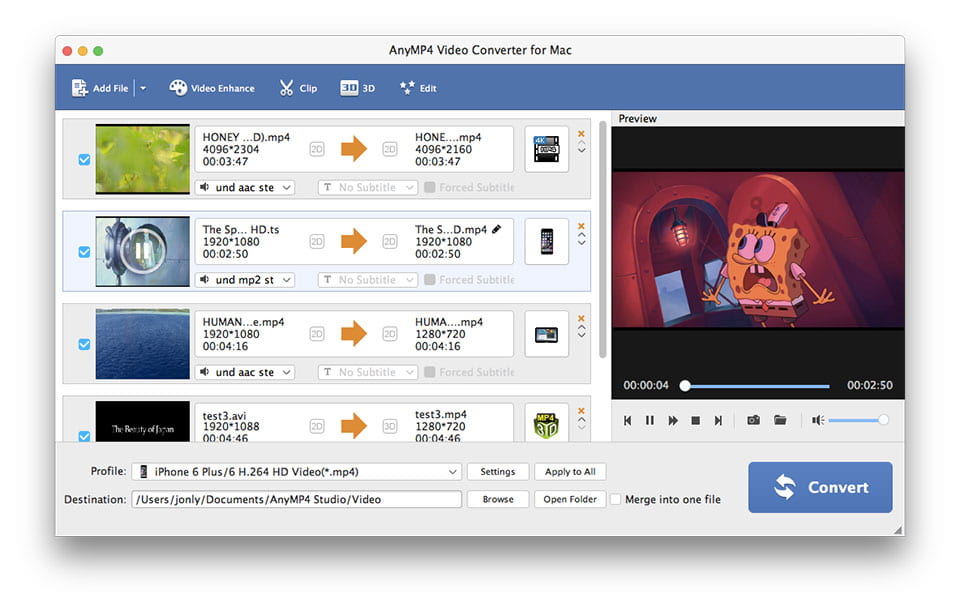
After adding videos to the program, you can watch them fluently in the preview window. When previewing the videos, you're free to take a snapshot of your desired video image as you like.

Choose audio track and subtitle
If the source video includes alternative audio track and subtitle, just choose the one you need for the output video.
Screenshot
Reviews
Reference
OS Supported: Mac OS 10.12 (Sierra) or later (including macOS 27 Golden Gate beta and Tahoe 26)
Hardware Requirements: 512MB RAM, Super VGA (800×600) resolution, 16-bit graphics card or higher
| Support Input File Formats | |
| Audio | FLAC, WAV, WMA, MP3, MP2, AAC, AC3, AIFF, APE, CAF, MPC, QCP, OGG, M4A, M4B, AUD, MKA, AIFC, RA, RAM, AU, AIF, CUE |
| 4K Video | 4K H.265/HEVC Video, 4K H.264/MPEG-4 AVC, 4K TS, 4K AVI, WebM-VP8 4K WebM, WebM-VP9 4K WebM, 4K H.264 TS, XviD 4k, 4K H.264 FLV, 4K MKV FLV, Youtube 4K | General Video | TS, MTS, M2TS, MXF, TRP, TP, MP4, M4V, QT, MOV, MPG, MPEG, MPEG2, MPEG4, MJPG, MJPEG, AVI, 3GP, 3G2, FLV, MOD, TOD, RM, RMVB, WMV, ASF, MKV, SWF, F4V, VOB, DAT, DV, DIF, OGM, WTV, DVR-MS, Bink video, WebM |
| HD Video | MTS, TS, M2TS, TP, TRP, HD MPG, HD MPEG, HD MPEG2, HD MPEG4, HD MP4, HD WMV, QuickTime HD MOV |
| Support Output File Formats | |
| 4K Video | 4K H.265/HEVC Video, 4K H.264/MPEG-4 AVC, 4K TS, 4K AVI, WebM-VP8 4K WebM, WebM-VP9 4K WebM, 4K H.264 TS, XviD 4k, 4K H.264 FLV, 4K MKV FLV, Youtube 4K |
| General Video | MPG, MPEG-1, MPEG-2, MPEG-4, H.264, H.264/MPEG-4 AVC, DivX, XviD, AVI, FLV, MP4, M4V, MKV, MOV, 3GP, 3G2, MTV, SWF, WMV, WMV-2, ASF, DPG, TS, DV, VOB, AMV, ProRes Proxy, ProRes LT, ProRes Standard, ProRes HQ, WebM |
| HD video | TS, HD MP4, HD AVI, HD MOV, HD ASF, HD H.264/MPEG-4 AVC, HD MPEG-4, MPEG-2 HD, HD MKV, HD MPG, HD MPEG-4 TS, MPEG-2 TS HD, HD H.264 TS, DivX HD, XviD HD, YouTube HD, HD FLV, HD WMV, HD VOB, HD WebM |
| Audio | FLAC, WAV, WMA, AAC, ALAC, AC3, AIFF, AMR, AU, MP3, MP2, M4A, MKA, OGG |
| 3D Video | MP4 Side by Side 3D, MP4 Top and Bottom 3D, MP4 Anaglyph 3D, MKV Side by Side 3D, MKV Top and Bottom 3D, MKV Anaglyph 3D, TS Side by Side 3D, TS Top and Bottom 3D, TS Anaglyph 3D, AVI Side by Side 3D, AVI Top and Bottom 3D, AVI Anaglyph 3D, FLV Side by Side 3D, FLV Top and Bottom 3D, FLV Anaglyph 3D |
| Supported Portable Devices | |
| Apple Device: iPhone 17/Air/17 Pro/17 Pro Max, iPhone 16/16 Plus/16 Pro/16 Pro Max, iPhone 15/15 Plus/15 Pro/15 Pro Max, iPhone 14/14 Plus/14 Pro/14 Pro Max, iPhone 13/13 Pro/13 Pro Max/13 mini, iPhone 12 Pro Max/12 Pro/12/12 mini, iPhone 11 Pro Max/11 Pro/11, iPhone XS/XS Max/XR/X/8/8 Plus/7/7 Plus/6s/6s Plus/6/6 Plus/SE/5s/5c/5/4s/4, iPad, iPad Pro/mini 4/mini 3/mini 2/mini/Air 2/Air, iPod touch/nano, Apple TV 4K, Apple TV Game Console: PSP, PSP GO, PSP 3000, PS3, PlayStation Vita, NDS, Wii, Xbox360 Media Device: Archos, Creative Zen, Zen player, iRiver, Sansa, Sony Walkman, Zune Other Device: Samsung Galaxy Tab, Galaxy Note, Galaxy S series, Microsoft Surface, GPhone, Google Nexus One, HP TouchPad, Kindle Fire, Windows Phone, Nokia, Nokia Lumia, Nokia Stereo, Nokia Mono, HTC Driod, HTC One, LG, BlackBerry, Sony Device, Sony XPERIA, Sony Tablet S, Motorola, Moto X, Dell, Dell Mini, Toshiba Thrive, Acer ICONIA, HP, Palm Pre, Acer, ASUS Eee Pad, General Pocket PC, Nook Table, etc. |
|
Our Users Are Also Downloading
 Video Converter Ultimate for Mac
Rip homemade DVD and convert videos to other formats on Mac.
Free Download Buy Now DVD Creator for Mac
Provides the best solution to convert any video format to DVD disc, DVD folder and ISO file on Mac.
Free Download Buy Now Blu-ray Player for Mac
Play Blu-ray movies including Blu-ray discs, Blu-ray folder and ISO file on Mac.
Free Download Buy Now