User Review (3)  Go to Win ->
$55.00 $41.25 25% OFF
WMV Converter Suite for Mac, composed of DVD to WMV Converter for Mac and WMV Video Converter for Mac, is the best solution to convert DVD movies and popular videos to WMV for Mac users. You're able to get WMV videos from any DVD disc, DVD folder or DVD ISO files with almighty DVD to WMV Converter for Mac. In addition, any video file like AVI, FLV, MP4, MXF, M2TS, MOV, M4V, etc and HD files like HD AVI, HD FLV, HD MP4 and more can be converted to WMV on Mac on your own wish. After the conversion, you can enjoy the videos on multiple media players like Samsung Galaxy S4, Nokia, BlackBerry, HTC, Motorola, LG, etc anytime you want.
What's more, this versatile WMV Converter Suite for Mac assists you to edit the videos with Effect, Trim, Crop, Watermark and Merge function. It supports batch conversion, thus you're able to get abundant WMV files at one time.


Adjust the video effect
You're able to adjust the video effect like brightness, saturation, contrast, hue and volume to get a better effect. Just drag the slide bar of each parameter to change the corresponding effect. It ensures you to get the most satisfying video effect when playing the videos on your multimedia players.

Crop Frame
Sometimes the videos you put on your mobile phone have black edges, which must bother you very much. Don't worry. You're able to get rid of the black edge of the video frame, thus you can crop the video frame according to the screen of your media players. Pretty cool!

Trim Video
If you think the video is too long, Trim function will help you just get your favorite video part for your enjoyment. In the Trim editing window, drag the slide block to set the start time and end time. With this function, getting the video part you want is very easy.

Add watermark
Would like to add your signature or images to make your video look more interesting? If you do, you're able to add text/image watermark to the video with the amazing Watermark function. The font size, font color and the position of the watermark is adjustable at will.

Merge Files
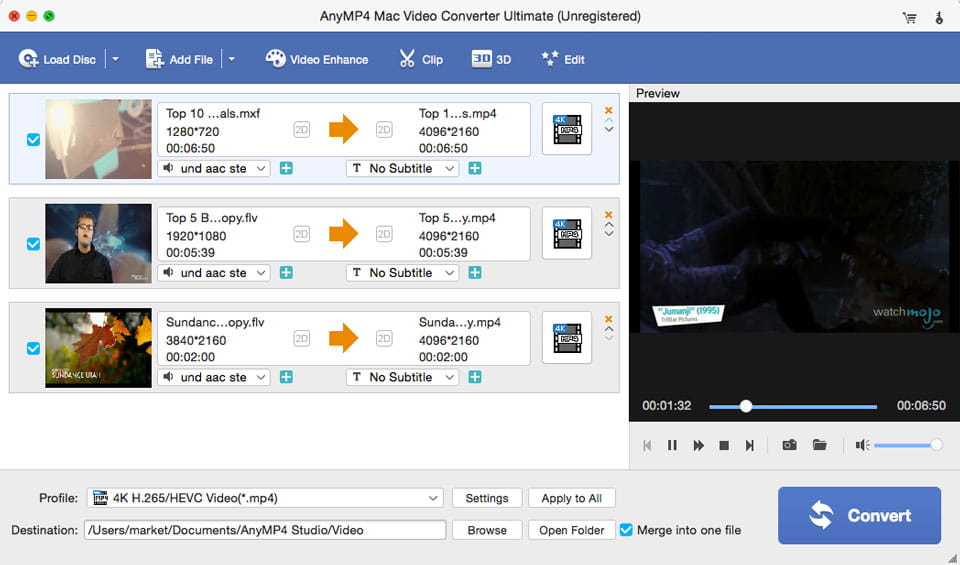
Merge function makes it possible to enjoy several video files successively. In the main interface of the program, select the video files you want to join in a single file and then click "Merge" button to join the videos together.

Preview/Snapshot
In the preview window, you're able to preview the source DVD movies and videos. When previewing the videos, click "Snapshot" button to capture your favorite video images, and then save them on your computer.

Clean and user-friendly
It's 100% clean and safe. Don't worry about any virus when downloading or operating the program. It supports batch conversion, so you can get several WMV videos at one time. In a word, it's such great WMV Converter Suite for Mac that you cannot miss.
Screenshot
Reviews
Reference
Processor: Intel® processor and Apple M-series chips (including M3)
OS Supported: Mac OS X 10.7 or later (including macOS 27 Golden Gate beta and Tahoe 26)
Hardware Requirements: 512MB RAM, Super VGA (800×600) resolution, 16-bit graphics card or higher
| Support Input File Formats | |
| DVD | DVD Disc, DVD Folder, DVD IFO Files |
| 4K Video | 4K H.265/HEVC Video, 4K H.264/MPEG-4 AVC, 4K TS, 4K AVI, WebM-VP8 4K WebM, WebM-VP9 4K WebM, 4K H.264 TS, XviD 4k, 4K H.264 FLV, 4K MKV FLV |
| HD Video | MTS, TS, M2TS, TP, TRP, HD MPG, HD MPEG, HD MPEG2, HD MPEG4, HD MP4, HD WMV, QuickTime HD MOV |
| General Video | TS, MTS, M2TS, MXF, TRP, TP, MP4, M4V, QT, MOV, MPG, MPEG, MPEG2, MPEG4, MJPG, MJPEG, AVI, 3GP, 3G2, FLV, MOD, TOD, RM, RMVB, WMV, ASF, MKV, SWF, F4V, VOB, DAT, DV, DIF, OGM, WTV, DVR-MS, Bink video, WebM |
| Audio | FLAC, WAV, WMA, MP3, MP2, AAC, AC3, AIFF, APE, CAF, MPC, QCP, OGG, M4A, M4B, AUD, MKA, AIFC, RA, RAM, AU, AIF, CUE |
| Support Output File Formats | |
| 4K Video | 4K H.265/HEVC Video, 4K H.264/MPEG-4 AVC, 4K TS, 4K AVI, WebM-VP8 4K WebM, WebM-VP9 4K WebM, 4K H.264 TS, XviD 4k, 4K H.264 FLV, 4K MKV FLV |
| Video | MPG, MPEG-1, MPEG-2, MPEG-4, H.264, H.264/MPEG-4 AVC, DivX, XviD, AVI, FLV, MP4, M4V, MKV, MOV, 3GP, 3G2, MTV, SWF, WMV, WMV-2, ASF, DPG, TS, DV, VOB, AMV, ProRes Proxy, ProRes LT, ProRes Standard, ProRes HQ, WebM, TS, HD MP4, HD AVI, HD MOV, HD ASF, HD H.264/MPEG-4 AVC, HD MPEG-4, MPEG-2 HD, HD MKV, HD MPG, HD MPEG-4 TS, MPEG-2 TS HD, HD H.264 TS, DivX HD, XviD HD, HD FLV, HD WMV, HD VOB, HD WebM |
| Audio | FLAC, WAV, WMA, AAC, ALAC, AC3, AIFF, AMR, AU, MP3, MP2, M4A, MKA, OGG |
| Support Devices | |
| iPad (iPad Pro, iPad mini 4, iPad Air 2), iPhone (iPhone 17/Air/17 Pro/17 Pro Max, iPhone 16/16 Plus/16 Pro/16 Pro Max, iPhone 15/15 Plus/15 Pro/15 Pro Max, iPhone 14/14 Plus/14 Pro/14 Pro Max, iPhone 13/13 Pro/13 Pro Max/13 mini, iPhone 12 Pro Max/12 Pro/12/12 mini, iPhone 11 Pro Max/11 Pro/11, iPhone XS/XS Max, iPhone XR/X, iPhone 8/8 Plus, iPhone 7/7 Plus, iPhone 6/6 Plus), iPod (iPod touch, iPod nano, iPod classic), Apple TV Android devices: Samsung, HTC, Motorola, LG, Acer, Dell Mobile phones: BlackBerry, Nokia, Motorola, LG, Sony Ericsson, Sony Xperia, Sony Walkman NDS, PSP, PS3, Wii, Xbox 360 Archos, Creative ZEN, iRiver, Sony Walkman, ZEN Player, Zune, Sansa General Pocket PC, HP iPAQ, Palm Pre, etc. |
|
Our Users Are Also Downloading
 Video Converter Ultimate for Mac
Rip homemade DVD and convert videos to other formats on Mac.
Free Download Buy Now DVD Creator for Mac
Provides the best solution to convert any video format to DVD disc, DVD folder and ISO file on Mac.
Free Download Buy Now Blu-ray Player for Mac
Play Blu-ray movies including Blu-ray discs, Blu-ray folder and ISO file on Mac.
Free Download Buy Now