User Review (2)  Go to Win ->
$25.00 $12.50 50% OFF
Zune Video Converter for Mac is especially designed for Zune users to convert almost all video and audio formats to Zune on Mac with excellent conversion quality and speed.
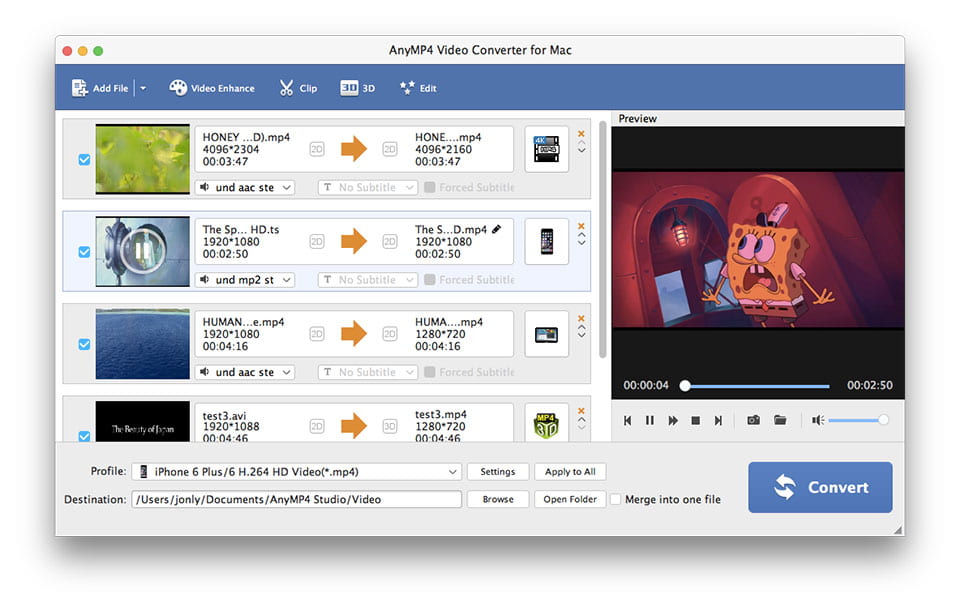
Moreover, this Zune Video Converter for Mac possesses additional functions: set output effect by adjusting Brightness, Contrast and Saturation, get any video clips from source video, crop video play screen, merge several video segments into one, and add text and picture watermark for video. All these operations bring you personalized video effect.


Convert any video formats, like MP4, WMV, MPEG, M4V, AVI, 3GP, FLV, HD videos and other video formats, to Zune video on Mac OS.
Convert videos and audios to Zune compatible audios, such as MP3, AAC, WMA and M4A.

Adjust Brightness, Contrast and Saturation to get better video output effect. Check Deinterlacing to eliminate some jaggedness.
Clip any video segments from source video by setting the exact start time and ending time or just by dragging the slide bar.
Adjust video aspect ratio to get the perfect play screen for your player.
Join several separated video segments into one long one for you to enjoy them successively.
If you like, you can add watermark for your video in form of text and picture.
You are allowed to choose the audio track and subtitle for your output video.
You can choose the compatible video and audio formats for your digital player.
It is available for you to choose Video Settings (Encoder, Resolution, Frame Rate and Bitrate) and Audio Settings (Encoder, Sample Rate, Channels and Bitrate). All settings can be saved as user-defined profile.

Zune Video Converter for Mac supports preview. You can see source video and converted video at the same time. What's more, you can catch your favorite pictures while previewing.
With intuitive interface, this Mac Zune Video Converter makes your conversion so easy that just a few clicks can finish the whole conversion.
With advanced technology, Zune Video Converter for Mac provides you with super fast conversion speed, which totally saves your time.
Screenshot
Reviews
Reference
Processor: Intel® processor and Apple M-series chips (including M3)
OS Supported: Mac OS X 10.7 or later (including macOS 27 Golden Gate beta and Tahoe 26)
Hardware Requirements: 512MB RAM, Super VGA (800×600) resolution, 16-bit graphics card or higher
| Support Input File Formats | |
| Video | MPG, MPEG, MPEG 2, VOB, DAT, MP4, M4V, TS, RM, RMVB, WMV, ASF, MKV, AVI, 3GP, 3G2, FLV, SWF, MPV, MOD, TOD, QT, MOV, DV, DIF, MJPG, MJPEG |
| HD Video | HD TS, HD MTS, HD M2TS, HD MPG, HD MPEG, HD MP4, HD WMV, QuickTime HD MOV, HD H.264, HD RM |
| Audio | MP3, MP2, AAC, AC3, WAV, WMA, M4A, RM, RAM, OGG, AU, AIF, AIFF, APE, FLAC, NUT |
| Support Output File Formats | |
| Video | AMV, MP4, ASF, AVI, 3GP, WMV, DV, VOB, FLAC, FLV, MKV, MOV, TS, M4V, 3G2, MPG, MTV, DPG, SWF, DivX, XviD |
| 3D video | MP4 Side by Side 3D, MP4 Top and Bottom 3D, MP4 Anaglyph 3D, MKV Side by Side 3D, MKV Top and Bottom 3D, MKV Anaglyph 3D, TS Side by Side 3D, TS Top and Bottom 3D, TS Anaglyph 3D, AVI Side by Side 3D, AVI Top and Bottom 3D, AVI Anaglyph 3D, FLV Side by Side 3D, FLV Top and Bottom 3D, FLV Anaglyph 3D |
| Audio | AAC, AC3, AIFF, AMR, AU, M4A, MKA, MP3, MP2, OGG, WAV, WMA |
| Snapshot Image | JPEG, GIF, BMP |
| Support Devices | |
| iPad (iPad Pro, iPad mini 4, iPad Air 2), iPhone (iPhone 17/Air/17 Pro/17 Pro Max, iPhone 16/16 Plus/16 Pro/16 Pro Max, iPhone 15/15 Plus/15 Pro/15 Pro Max, iPhone 14/14 Plus/14 Pro/14 Pro Max, iPhone 13/13 Pro/13 Pro Max/13 mini, iPhone 12 Pro Max/12 Pro/12/12 mini, iPhone 11 Pro Max/11 Pro/11, iPhone XS/XS Max, iPhone XR/X, iPhone 8/8 Plus, iPhone 7/7 Plus, iPhone 6/6 Plus), iPod (iPod touch, iPod nano, iPod classic), Apple TV Android devices: Samsung, HTC, Motorola, LG, Acer, Dell Mobile phones: BlackBerry, Nokia, Motorola, LG, Sony Ericsson, Sony Xperia, Sony Walkman NDS, PSP, PS3, Wii, Xbox 360 Archos, Creative ZEN, iRiver, Sony Walkman, ZEN Player, Zune, Sansa General Pocket PC, HP iPAQ, Palm Pre, etc. |
|
Our Users Are Also Downloading
 Video Converter Ultimate for Mac
Rip homemade DVD and convert videos to other formats on Mac.
Free Download Buy Now DVD Creator for Mac
Provides the best solution to convert any video format to DVD disc, DVD folder and ISO file on Mac.
Free Download Buy Now Blu-ray Player for Mac
Play Blu-ray movies including Blu-ray discs, Blu-ray folder and ISO file on Mac.
Free Download Buy Now