
Advanced in converting and editing videos, MTS to SWF Converter facilitates diverse needs of users. This specially designed MTS Converter embraces not only converting MTS videos to SWF, but also convert MTS files to other formats, whatever HD or SD formats. Apart from video files converting, this MTS to SWF Converter endows with variety of customized editting options. To convert MTS to SWF, MTS to SWF Converter is bound to be your choice to convert video with flawless visual experience.
What you need?
Software: MTS Converter
OS Supported: Windows 8, Windows 7, Windows XP (SP2 or later), Windows Vista
Hardware Requirements: 800MHz Intel or AMD CPU, or above; 512MB RAM or more
Step 1 Launch MTS to SWF Converter and import .MTS files
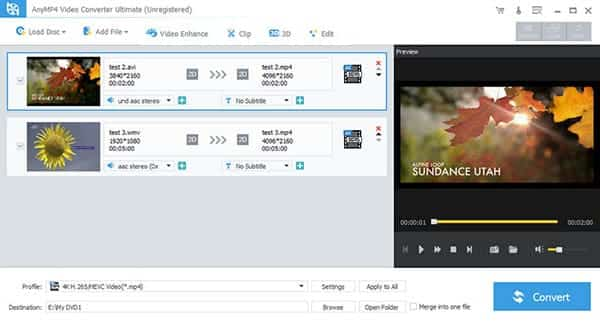
After launch MTS to SWF Converter, you can add .MTS files to this video converter by clicking "Add Video" button.
Step 2 Choose SWF format and select folder for output video
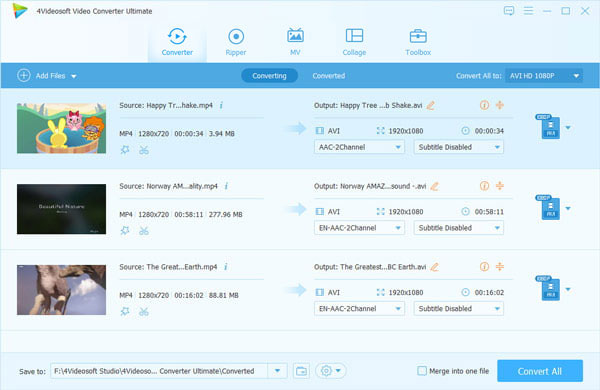
Choose SWF format from the drop-down menu of "Profile". Should the defaulted destination is not your favorite, you can click "Browse" to choose.
Step 3 Edit videos and set detailed parameters (Optional)
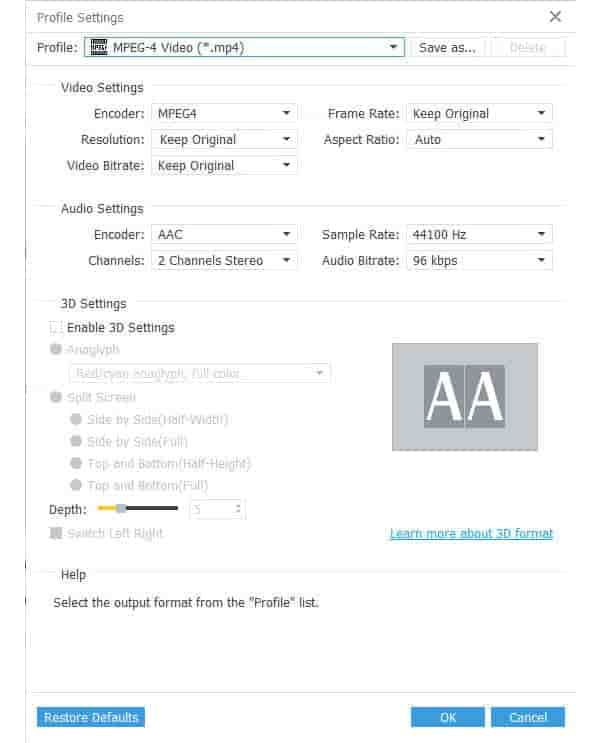
You can adjust the video brightness, contrast, saturation, volume, hue by clicking the "Effect" icon, change time-length by clicking "Trim", crop play screen by clicking "Crop", etc. Besides, you can also set detailed parameters as you like, such as Video/Audio Bitrate, Sample Rate, Channels, Resolution and so on.
Step 4 Start to convert MTS to SWF
When everything is set to your demand, just click the "Convert" button to convert MTS to SWF.

 Free Download
 Free Download


