User Review (3)  Go to Mac ->
$31.20 $15.60 50% OFF
DVD to Walkman Converter is especially designed for Sony Walkman users, which helps users to convert homemade DVD to MPEG4, MP4, MP4 AVC, as well as converting homemade DVD to Sony Ericsson 3GP, MP4 and converting DVD for PSP, PS3.
With its powerful editing functions, DVD to Walkman Converter can totally enhances your video effect by adjusting its Brightness, Contrast, Saturation and aspect ratio. You also can trim and merge videos.

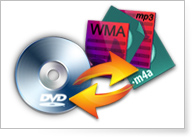
You can convert homemade DVD to Sony Walkman supporting MPEG4, MP4 AVC and MP4 formats. It also can convert homemade DVD to other video formats, like 3GP, AVI etc.
You are allowed to extract audios (MP3, WMA, M4A and WAV) from homemade DVD files.
It can be sued to convert homemade DVD to any Sony Walkman players, even convert homemade DVD to Sony XPERIA, DVD to Sony Ericsson, DVD to PSP and PS3.

By adjusting video Brightness, Contrast and Saturation, you can personalize your video output effect
You can clip any time-length video segment from source video by setting the exact start and end time, or by dragging the slide bar.
You can choose the Zoom Mode and adjust aspect ratio to get the suitable play screen for your player.
Join several separated video clips together for you to enjoy successive video later.
Add text and picture watermark for your preference. You can adjust its position and resolution as you like.

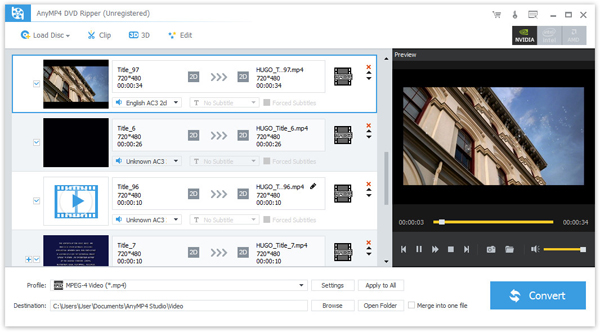
DVD to Walkman Converter allows you to choose the subtitle and audio track for your converted video. You can also choose to output video without any audio track.
You are allowed to choose the suitable video and audio format for your player.
You can choose video settings and audio settings for your output video, such as Video Encoder, Resolution, Frame Rate, Video Bitrate, and Audio Encoder, Sample Rate, Channels and Audio Bitrate.

With its intuitive interface, this DVD Converter is really easy-to-use software for you to convert homemade DVD to walkman.
DVD to Walkman Converter provides you with super fast conversion speed, totally supports multi-core CPU.
Screenshot
Reviews
Reference
OS Supported: Windows 11, Windows 10, Windows 8/8.1, Windows 7
Hardware Requirements: 800MHz Intel or AMD CPU, or above; 512MB RAM or more
| Support Input File Formats | |
| DVD | DVD Disc, DVD Folder, DVD IFO Files |
| Support Output File Formats | |
| Audio | FLAC, WAV, WMA, AAC, ALAC, AC3, AIFF, AMR, AU, MP3, MP2, M4A, MKA, OGG |
| General Video | MPG, MPEG-1, MPEG-2, MPEG-4, H.264, H.264/MPEG-4 AVC, DivX, XviD, AVI, FLV, MP4, M4V, MKV, MOV, 3GP, 3G2, MTV, SWF, WMV, WMV-2, ASF, DPG, TS, DV, VOB, AMV, ProRes Proxy, ProRes LT, ProRes Standard, ProRes HQ, WebM |
| HD Video | TS, HD MP4, HD AVI, HD MOV, HD ASF, HD H.264/MPEG-4 AVC, HD MPEG-4, MPEG-2 HD, HD MKV, HD MPG, HD MPEG-4 TS, MPEG-2 TS HD, HD H.264 TS, DivX HD, XviD HD, YouTube HD, HD FLV, HD WMV, HD VOB, HD WebM |
Tutorials & Articles
Our Users Are Also Downloading
 Blu-ray Player
Play Blu-ray movies including Blu-ray discs, Blu-ray folder and ISO file on PC.
Free Download Buy Now DVD Creator
Provides the best solution to convert any video format to DVD disc, DVD folder and ISO file.
Free Download Buy Now