
Eager to put your DVD on iPhone, iPhone 3g?This document will offer you step-by-step guide on how to convert DVD to iPhone video/audio format, how to Convert DVD to iPhone 3G format for playback on iPhone with DVD to iPhone Converter. From this step-by-step guide, you will get an easy-to-use way to freely enjoy your favorite DVD movies on iPhone whether you're a veteran or just a fresh hand. If you are the Mac users, please refer to DVD to iPhone converter for Mac.
Step 1 Import your DVD files
Double click this DVD to iPhone converter, then you will see the following screen.
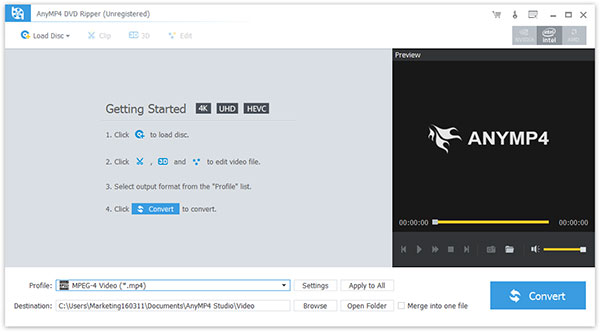
(1) Load DVD
Click "Load DVD" load DVD you want to convert.
(2) Select output format from the "Profile" list:
Choose the output format from the "Profile" column, find what your iPod supporting format.Browse your computer to find a suitable place to save your output files

(3) Settings: Click "Settings" to open the settings window.
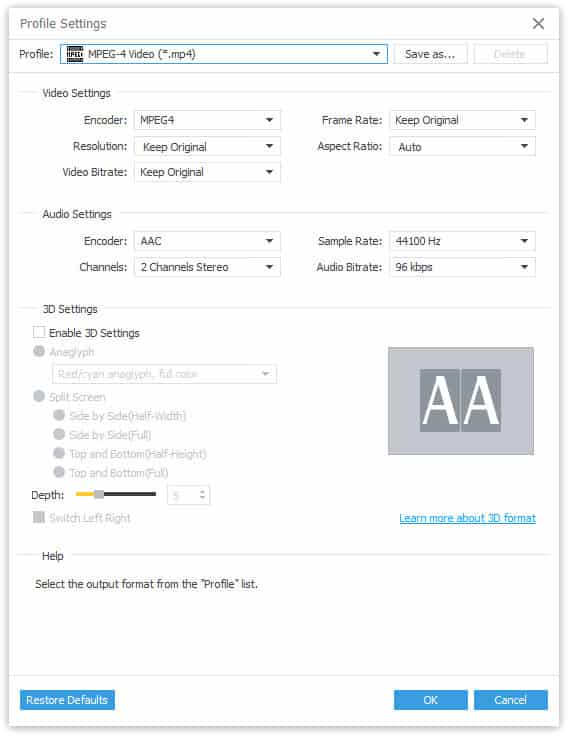
(4) Merge into pne file
Merge your selected DVD sources into one file after conversion for you to enjoy successively.
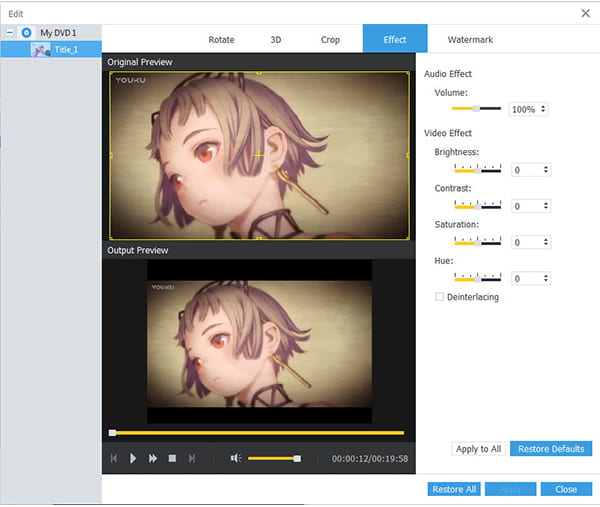
Step 2 Optimize output effect
You are allowed to customize the output effect at your will with Trim, Crop, Watermark, Effect buttons
Step 3 Start DVD to iPhone conversion
Click the "Convert" button to start the conversion work.

 Free Download
 Free Download


