
DVD to PS3 Converter supports converting DVD to PS3 in 1080P, 720P, 480P resolution, even to PSP, and convert video to PS3 MP3, AAC, WMA audio with high quality. Here is the guide on how to convert DVD to PS3 or rip DVD to PS3.
Step 1 Load a DVD to rip for PS3
Double click this DVD to PS3 Converter, then you will see the following screen.
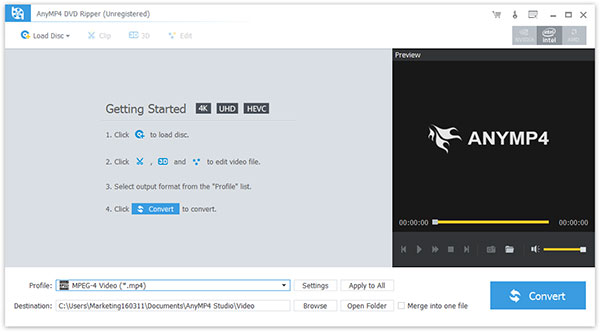
Click Load DVD button to add you want to rip DVD.
You can rip the following DVD files: DVD disc, DVD Folder, IFO file.
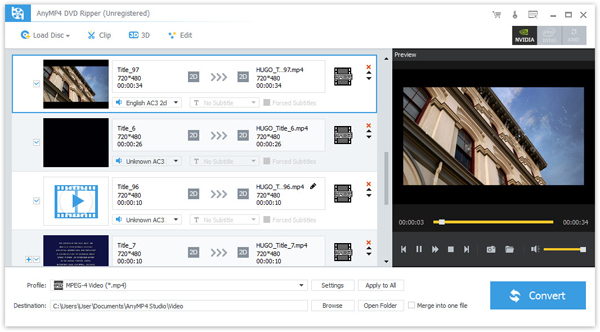
After you load DVD, you would see the following screen:
Step 2 Choose profiles
Choose the output format from the "Profile" pull-down menu, find what your player supporting format or the devices.

The supporting output formats can be seen in the following: H.264/MPEG-4 AVC, H.264, MPEG-4, DivX, XviD, AVI, MP4, WMV, MPG, TS, WebM, M4A, MP3, WAV, WMA, FLAC.
(1) Settings: In order to optimize the output video or audio, you can specifying the video/audio settings. Click "Settings" to open the settings window.
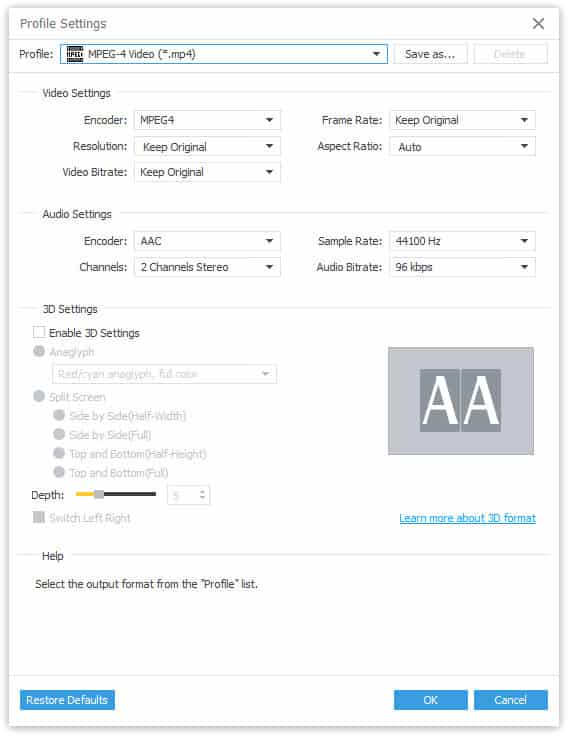
(2) Audio Track, Subtitle: You can set the output settings for the selected file:
Audio Track: Select audio track for your selected file (either a title or a chapter).
Subtitle: Select subtitle for your selected file (either a title or a chapter)
(3) Merge: You also can put you file into one, just click" Merge into one file", that's ok.
(4) Destination: Click the "Browse", you can put the converted file into what you want disk, and in the "Open Folder", you can find the file
Step 3 Start Conversion
Click the "Convert" to rip your DVD.
If you want to edit your DVD video, including trim DVD video, crop DVD video, capture the picture, please visit the next part: How to edit, crop, trim DVD clips take picture?

 Free Download
 Free Download


