
How to transfer video to Zune? How to enjoy movies on your Zune player? Zune Video Converter is specially designed for you. This Zune Video Converter can directly convert all popular video and movie files to Zune WMV, MP4, H.264, and transfer the converted file(s) to your Zune player with ease. The video to Zune transfer can also transfer movie to Zune exactly. Follow this guide, you can transfer movie to Zune with only a few clicks easily. For Mac users, please refer to Zune Video Converter for Mac.
What you need?
Software: 3D Converter
OS Supported: Windows 8, Windows 7, Windows XP (SP2 or later), Windows Vista
Hardware Requirements: 800MHz Intel or AMD CPU, or above; 512MB RAM or more
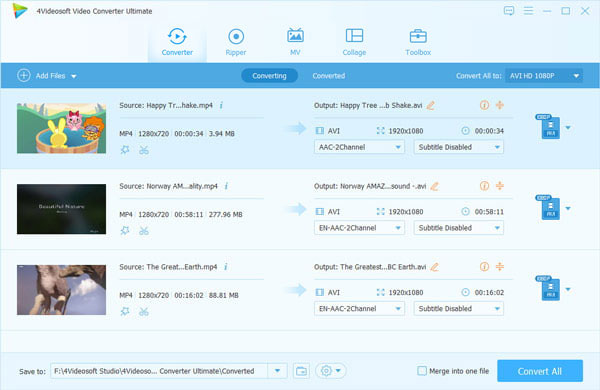
Step 1 Add video files to convert
You can add all your videos from your computer or other hard drive to this Zune Video Converter.
Step 2 Select output profile
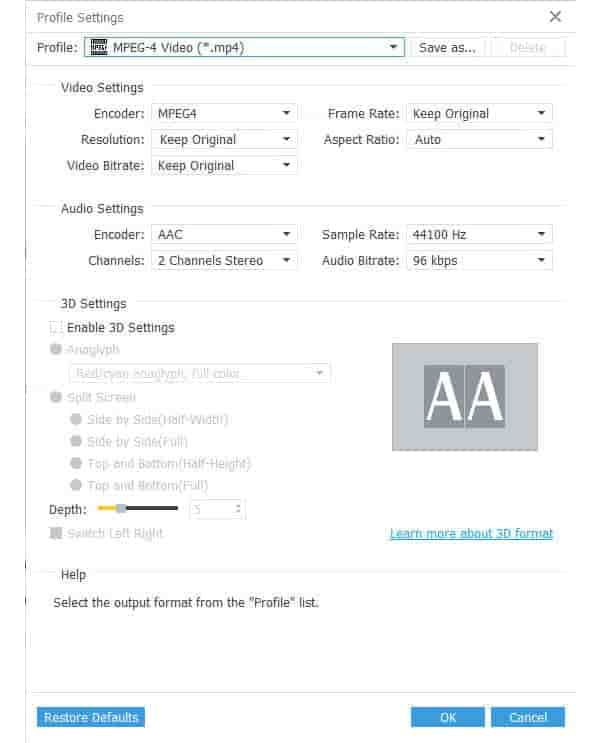
You can choose output formats from Profile list , Browse computer to set the destination folder and get the destination by clicking "Open Folder", It is also allowable to select audio track and subtitle for output file
Step 3 Start to transfer video to Zune
The last step you need is to click the button to finish the whole process.

 Free Download
 Free Download


